Windows Scheduled Tasks Password Reset
In enterprise environments, Windows Scheduled Tasks are widely used to automate scripts, applications, and administrative jobs. These tasks typically run under the security context of a designated domain account, and the Task Scheduler service requires the corresponding password to authenticate and grant execution privileges. By default, these credentials are securely encrypted and stored in the Credential Manager. However, this mechanism introduces a challenge: when the password of the associated account is rotated, the stored password becomes obsolete. As a result, the scheduled task will fail during its next execution attempt, as the credentials are no longer valid.
PAM360 facilitates the update of stored credentials in the Credential Manager whenever the password of the domain account used to run scheduled tasks is rotated, ensuring that they remain operational even after password changes. This automated process eliminates manual intervention, reduces administrative overhead, and prevents task execution failures caused by password mismatches.
This help document covers the following topics in detail:
1. Prerequisites
Ensure the following software prerequisites are met on the target Windows servers where the scheduled tasks are running before utilizing the Windows Scheduled Task Password Reset feature in PAM360:
- Software Requirements
- Microsoft .NET Framework 4.5.2 or above
- Microsoft Visual C++ 2015 Redistributable
- Additionally, ensure the following services are running:
- Windows RPC service
- Windows Management Instrumentation (WMI) service - WMI connectivity from the PAM server to member servers and domain controllers
These components are required for PAM360 to establish secure connections with the target servers and successfully update scheduled tasks when the associated domain account passwords are reset.
Additional Details
- Windows Scheduled Task password reset is supported only for Task Scheduler V2.
- If PAM360 is running on Windows Server 2016, it cannot reset the passwords of scheduled tasks running on lower operating system versions (for example, Windows Server 2008 or below).
2. Workflow
Whenever a password reset operation is initiated for a domain account used by scheduled tasks, PAM360 automatically identifies all scheduled tasks running on the relevant member servers that are configured with the account. It then establishes a secure, authenticated connection with each server and supplies the updated password to the Windows Task Scheduler service, which subsequently encrypts and stores it using DPAPI.
To ensure this process runs seamlessly, add all member servers where the scheduled tasks are running to a static group and associate the resource group with the domain account. This allows PAM360 to automatically update the stored credentials in Windows Task Scheduler whenever the domain account password is reset.
Before associating the resource group that contains the member machines running scheduled tasks with the domain account, ensure the following configurations are in place:
- The domain controller is added as a Windows Domain resource in PAM360. If not, add the domain controller as a resource by following the steps provided in this link.
- Add the domain account credentials used by the scheduled tasks to the Windows Domain resource. Explore this link for detailed steps to add accounts to a resource.
- Remote password reset is configured for the Windows Domain resource. Explore this link for detailed steps to configure remote password reset for a Windows Domain resource.
- All the member servers where Windows Scheduled Tasks are running are added as resources in PAM360.
- All the member servers are added to a static resource group. Explore this link for more information on adding resources to a static group.
3. Configuring Scheduled Tasks Password Reset
Follow these steps to associate the resource groups containing the member servers where the scheduled tasks are running with the domain account to automatically update the stored credentials in the Windows Task Scheduler when the domain account password is reset:
- Navigate to the Resources tab and click on the Windows Domain resource.
- In the Account Details window that appears, click the Account Actions icon beside the domain account associated with the scheduled tasks, and select Edit Account from the displayed options.

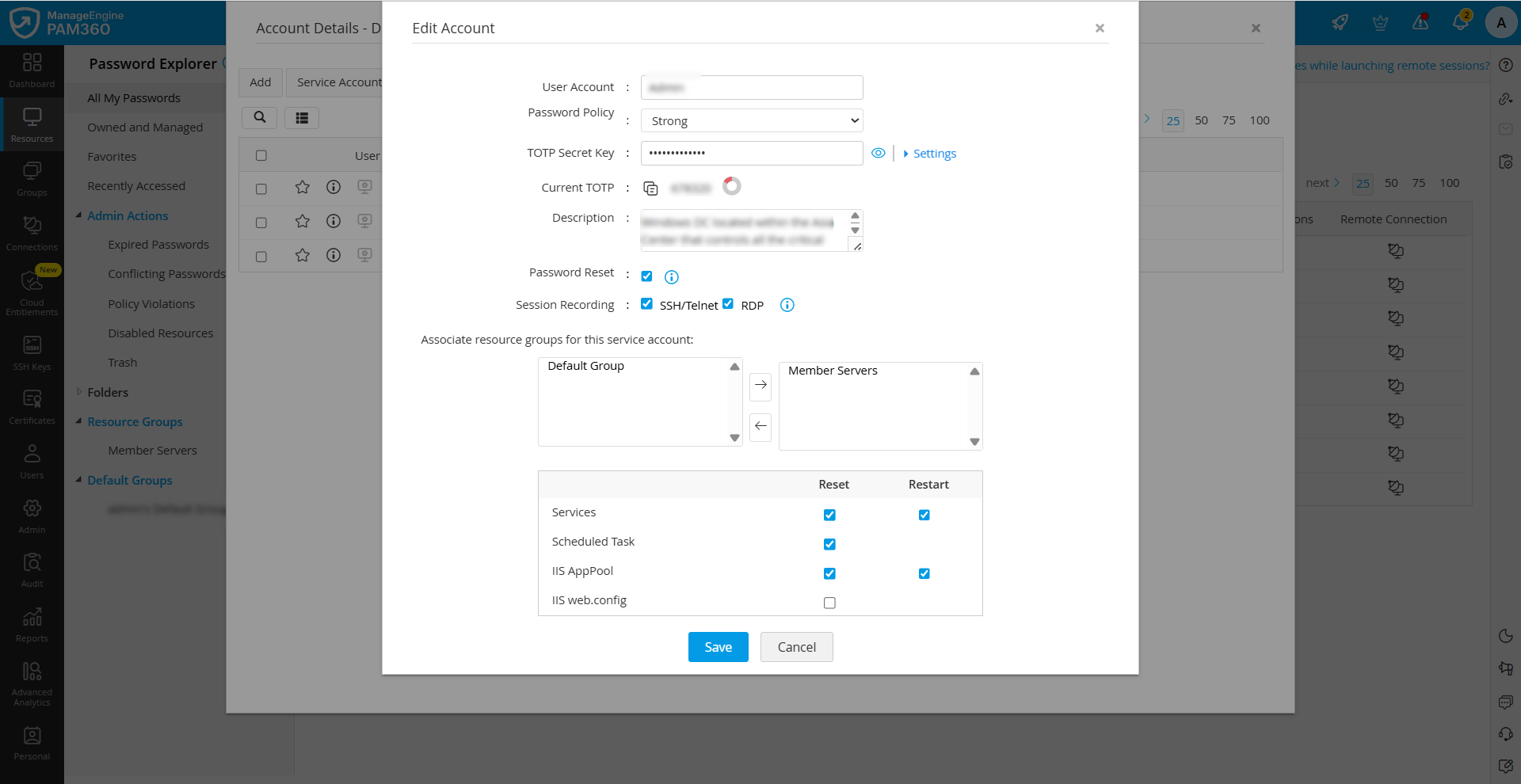
- In the Edit Account window that appears, under Associate resource group for this service account, click on the resource groups containing the member servers where the scheduled tasks are running, and click the right arrow button.
- Enable the Scheduled Task checkbox under the Reset column and click Save.
4. Viewing Scheduled Task Status
For any Windows Domain account, you can view a list of all associated scheduled tasks and information about the status of password update upon domain account password reset.
- Navigate to the Resources tab and click on the Windows Domain resource.
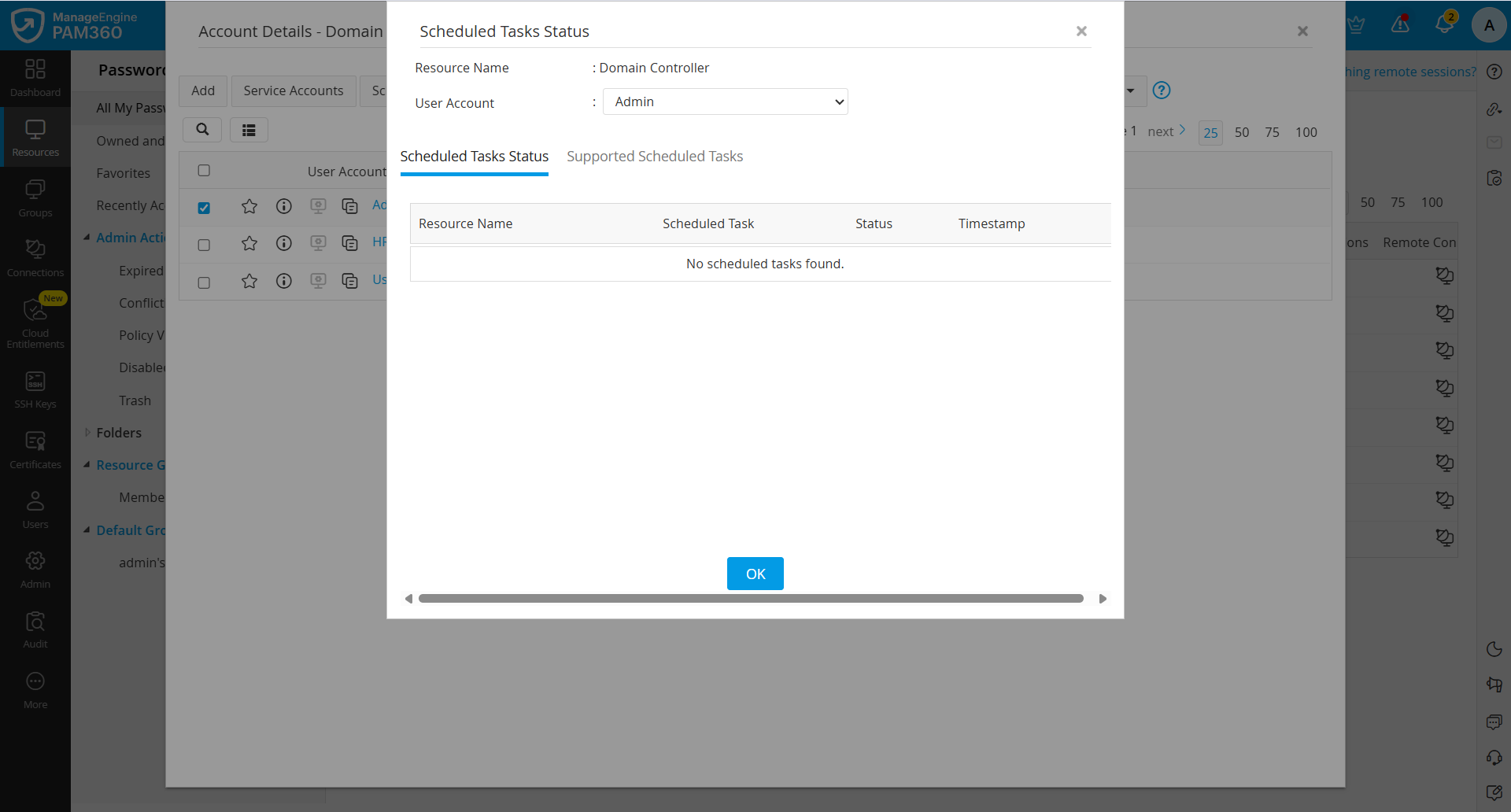
- In the Account Details window that appears, tick the checkbox beside the domain account associated with the scheduled tasks, and click the Scheduled Tasks button in the top pane.
- In the window that appears, you will see the selected resource and account names. Switch to the Scheduled Task Status tab, where you will see a list of all scheduled tasks associated with the selected domain account, along with relevant information such as the name of the scheduled task, the resource on which the scheduled task is running, its status, and timestamp.
Additional Detail
If you have created schedules for rotating the domain account passwords, the scheduled tasks password reset will also follow the configured Windows Domain account password reset schedule.