OpUtils REST API

OpUtils offers REST APIs for adding and fetching data from OpUtils. Using these APIs, you can integrate OpUtils with third-party IT management/service desk software.

How OpUtils REST APIs work?

The APIs work with an API key. The API key is unique for each OpUtils account and is mandatory for all API requests.

How to view the API Key?

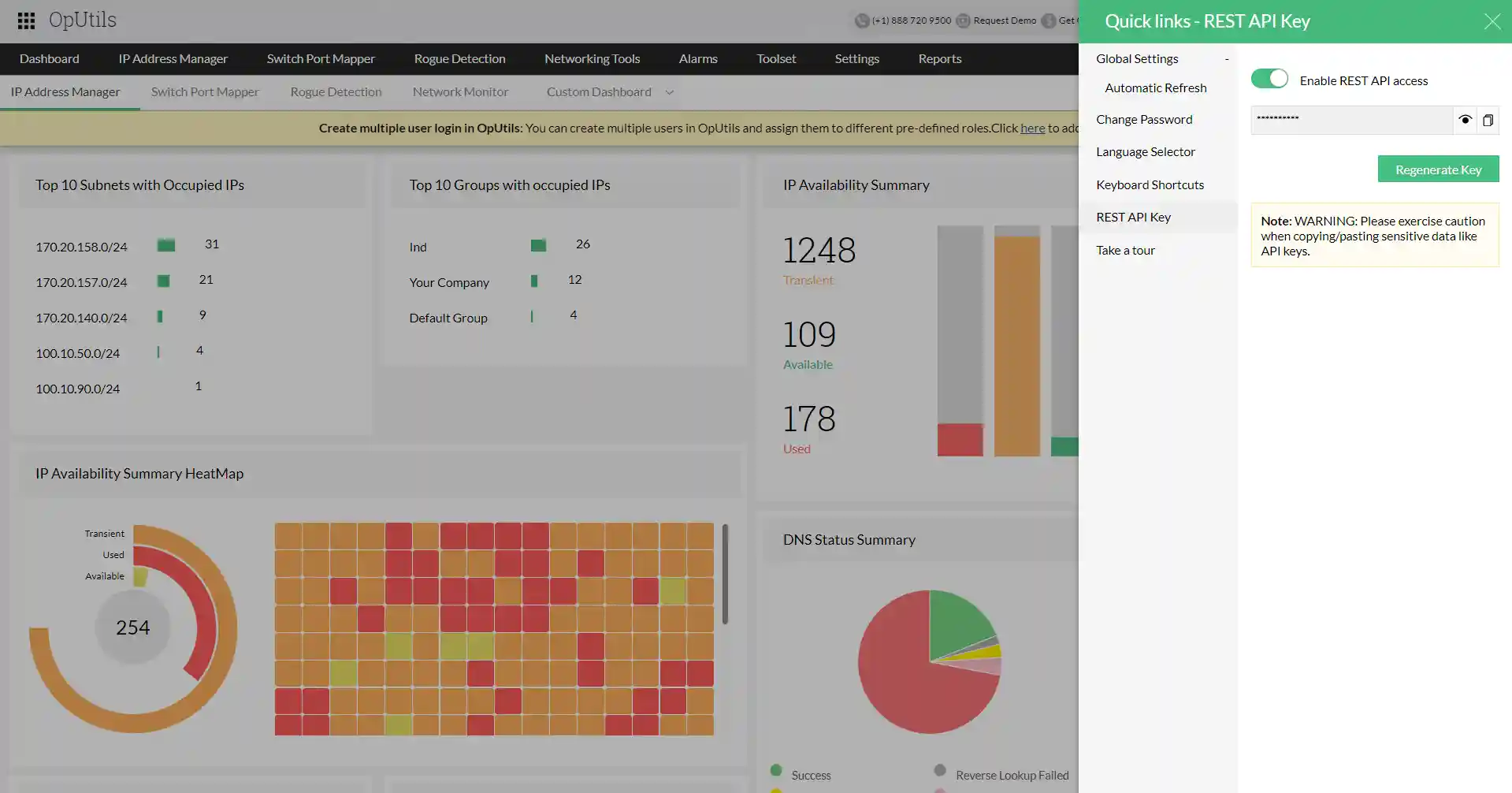
To view or copy an API key, go to Quick links > Rest API Key option in OpUtils web client.(The quick link option is the Gear icon on the top right corner)

Enable / Disable Rest API access

REST API menu under Quick links will display the REST API key, and external REST API calls will be allowed only if the REST API access has been enabled for the user.

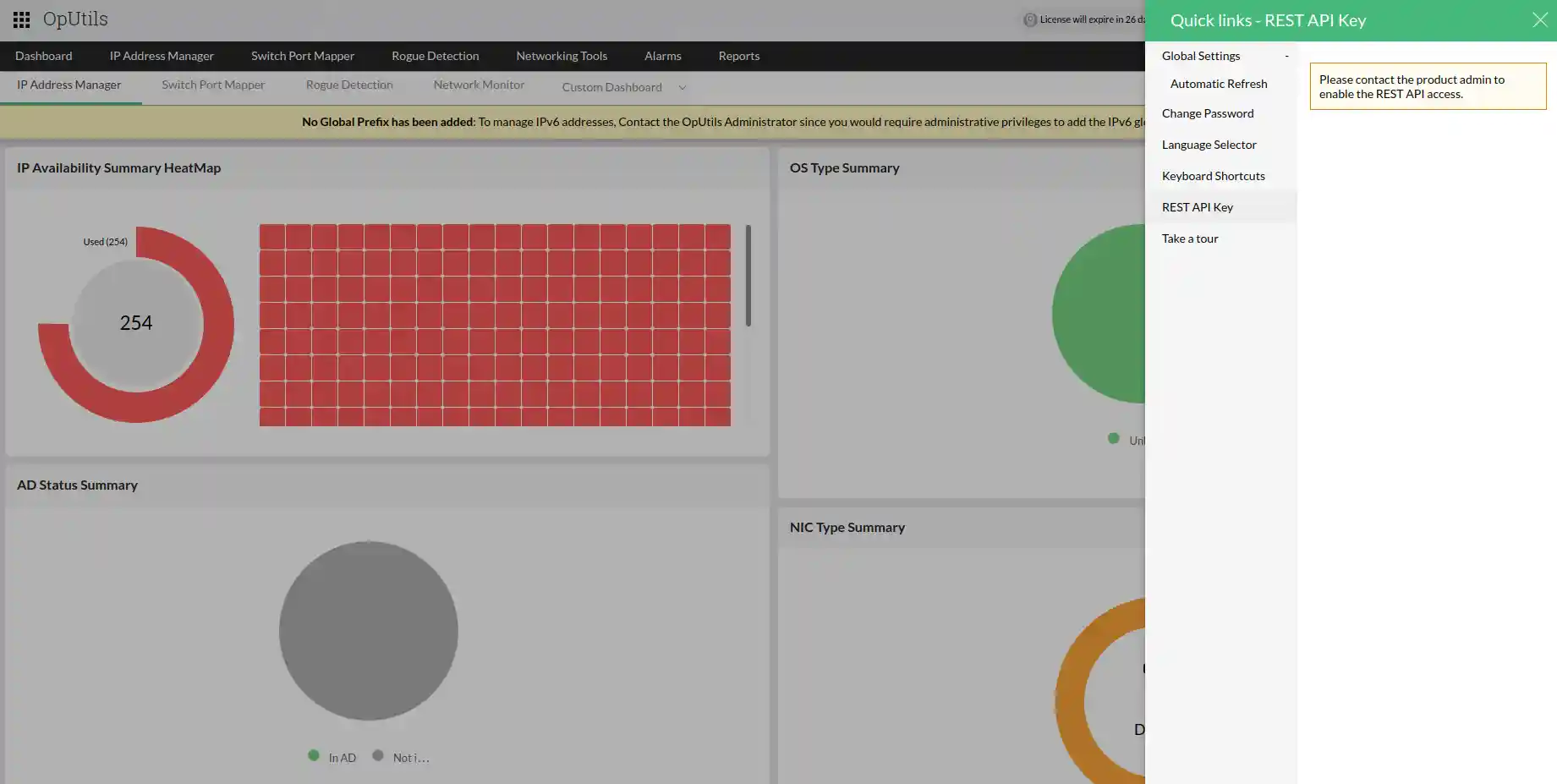
If the REST API access has been disabled, the REST API menu under Quick links will display "Contact the administrator user".

Note:

TFA: If Two-Factor Authentication has been configured, TFA OTP validation is mandatory to enable REST API access.

Regenerate an API key: To generate an API key, go to Settings > Basic Settings > REST API in OpManager web client and click on Regenerate Key.

Overview

OpUtils Application Programming Interface (API) allows you to programmatically connect to the database used by OpUtils to get the required information. While it is also possible to manually connect to the database using ODBC and fetch the information by constructing an SQL query, API eases it by not requiring you to be conversant with the database schema and relationships with various database tables. OpUtils API benefits you in many ways:

  • Get the required information programmatically to be used in other in-house or third-party applications
  • Link it to other third-party reporting tools for customized reporting
  • You don't need to understand how the data is stored in the various database tables and the relationships with other tables/data.

Using API

Requests to OpUtils API via URL, which connects to the OpUtils database and get the required information. The URL construct should be as follow:

https://<oputils_server_name_or_ip>:<port_number>/oputilsapi/<oputils_module>?apiKey=<api_key>&operation=<operation_name>&<operation_parameters>

where,

<oputils_server_name_or_ip> refers to the dns name or the IP Address of the computer where OpUtils is installed

<port_number> refers to the port at which OpUtils runs, the default being 8060 or 8061

<oputils_module> refers to the specific OpUtils module you're querying to obtain the information.

<api_key> refers to the API Key for authenticating the query. The API Key is unique for every OpUtils User and has to be generated as per the instructions provided.

<operation_name> refers to the API Operation that you use for getting the information. The Operation Name varies depending on the type of data you need and the specific OpUtils modules. Please refer to module specific document for supported operations and operation parameters.

<operation_parameters> refers to the parameters or arguments for the parameter. Not all operations require a parameter; refer to module specific document for supported operations and operation parameters.

Example:
https://oputils-test1:8060/oputilsapi/ipam?apiKey=27559d9f-9866-411e-a71b-c44c2a04f299&operation=GET_SUBNET_SUMMARY&subnetAddress=12.18.118.0

HTTP Methods

OpUtils API uses appropriate HTTP verbs for every action.

Method Description:

  • GET - Used for retrieving resources.
  • POST - Used for creating resources and performing resource actions.
  • PUT - Used for updating resources.
  • DELETE - Used for deleting resources.

Supported Output Format/Response

The output of an API query will be in JSON format.

JSON RESPONSE PARAMETERS:

  • code - NetFlow Analyzer error code. Indicates zero for a success response and non-zero in case of an error.
  • message - Status Message for the invoked API.
  • data - Comprising the invoked API's Data.

IP Address Manager

IPAM module will help you get the following information about your IP space from OpUtils database:

  • Subnet Summary: Get the summary information about your subnets like Subnet Name, Subnet Address, Subnet Mask, Subnet Size, Used and Available IP Addresses, etc.
  • IP Address Details: Get the complete details of each and every IP in your network like IP Address, MAC Address, IP Status, DNS Status, Reserved Status, Connected Device Type, Authenticity, etc.
  • Subnet Summary: Get the complete details of all the subnets that are discovered in the network, which includes the details on the IP Address in each and every subnet.
  • IPAM Alerts: Get alerts on IPAM when specific IP Address is used or when the IP Address is available.
  • IPAM History: Retrieve the history of IP allocations and usage, track changes made to IP addresses, and gather specific details such as logged-on users, time of logon, date, etc., for auditing purposes.
  • Add AD Domain: Provides you the ability to add AD domain to your network.
  • Add Subnet: Provides you the ability to add a subnet to your network.

Subnets

getAllSubnetSummary

API name: getAllSubnetSummary

Method: GET

Description: Provides the summary details of all the subnets in your network. This operation does not require any additional parameter.

URL: api/json/ipam/getAllSubnetSummary?apiKey=<api_key>&&rows=100&page=1

Request sample:
https://122.10.22.160:8060/api/json/ipam/getAllSubnetSummary?apiKey=df2eac29ef194f4e5e412d36d6899611&&rows=100&page=1

Sample Response:

{"total":"1", "records":"1", "page":"1", "rows":[{"availableCount":"0", "transientPercentage":86,"Action":"", "ip-not-in-ad-count":"254", "notScannedCount":"0", "subnet-size":"254", "totalCount":"254", "subnet-name":"", "scandetails":"1110", "availablePercentage":0,"subnet-description":"", "added-time":"", "reserved-used":"0", "percentage":"14.17%", "dns-not-available-count":"212", "reserved-count":"0", "scan-status":"Scanned", "vlan-name":"", "usedCount":"36", "scan-status-int":"2", "notScannedPercentage":0,"subnetid":"4", "reserved-not-scanned":"0", "subnet-address-cidr":"121.22.10.0/24", "forward-lookup-failed-count":"4", "last-scan-time":"25 Oct 23,05:06PM", "subnet-mask":"255.255.255.0", "ipaddress-in-long":"2887222529", "reverse-lookup-failed-count":"34", "transientCount":"218", "dns-success":"0", "usedPercentage":"14.17", "group-name":"DefaultGroup", "reserved-transient":"0", "snapshot-id":"304", "subnet-address":"121.22.10.0", "broadcast-address":"121.22.10.255", "reserved-available":"0", "credentialId":"", "location":"", "ip-mismatch-count":"4", "ip-in-ad-count":"0", "created-by":"--"}],"status":"Success"}

Parameter name
Description
apiKey
Api Key as string
rows
Specify the no of IP Addresses you want to fetch Warning : Higher count consumes high CPU and run time memory.
page
Specify the pagination number

getSubnetSummary

API name: getSubnetSummary

Method: GET

Description: Provides you the summary details of a specified subnet. Please specify the subnet address as a parameter for this operation.

URL: api/json/ipam/getSubnetSummary?subnetAddress=<subnet_address>&apiKey=<api_key>&snapType=IPAMSubnet

Request sample:
https://122.10.22.160:8060/api/json/ipam/getSubnetSummary?subnetAddress=121.22.10.0&apiKey=df2eac29ef194f4e5e412d36&snapType=IPAMSubnet

Sample Response:

{"rows":[{"availableCount":"0", "transientPercentage":36,"Action":"", "ip-not-in-ad-count":"254", "notScannedCount":"0", "subnet-size":"254", "totalCount":"254", "subnet-name":"", "scandetails":"1110", "availablePercentage":0,"subnet-description":"", "added-time":"", "reserved-used":"0", "percentage":"64.17 %", "dns-not-available-count":"91", "reserved-count":"0", "scan-status":"Scanned", "vlan-name":"", "usedCount":"163", "scan-status-int":"2", "notScannedPercentage":0,"subnetid":"2", "reserved-not-scanned":"0", "GID":302,"forward-lookup-failed-count":"0", "last-scan-time":"25 Oct 23, 05:06 PM", "subnet-mask":"255.255.255.0", "ad-domain-id":"", "ipaddress-in-long":"3232252161", "reverse-lookup-failed-count":"163", "ad-domain-name":"", "transientCount":"91", "dns-success":"0", "usedPercentage":"64.17", "group-name":"Default Group", "reserved-transient":"0", "subnet-address":"121.22.10.0", "broadcast-address":"121.22.10.255", "reserved-available":"0", "credentialId":"null", "location":"", "ip-mismatch-count":"0", "ip-in-ad-count":"0", "created-by":"--"}],"status":"Success"}

Parameter name
Description
apiKey
Api Key as string
subnetAddress
Specify the Subnet Address you want to fetch
snapType
Specify as IPAMSubnet

getSubnetDetail

API name: getSubnetDetail

Method: GET

Description: Provides the complete details of all the IP Addresses in the specified subnet

URL: api/json/ipam/getSubnetDetail?subnetAddress=<subnet_address>&apiKey=<api_key>

Request sample:
https://122.10.22.160:8060/api/json/ipam/getSubnetDetail?subnetAddress=121.22.10.0&apiKey=df2eac29ef194f4e5e412d36d6899611

Sample Response:

{"rows":[{"phone-number":"", "connected-port-iftype":"", "ip-to-dns":"", "logged-on-user":"", "nic-type":"", "connected-port-ifindex":"", "dhcp-is-reserved":"", "connected-switch-port":"", "dns-status":"Reverse Lookup Failed", "connected-port-ifmtu":"", "system-name":"", "device-type":"", "connected-port-ifalias":"", "dns-to-ip":"", "alias-name":"", "dns-status-int":"2", "scan-status-int":"1", "dhcp-lease-expiry":"", "reserved-status-int":"1", "owner":"", "mac-address":"", "system-description":"", "reserved-status":"Not Reserved", "connected-switch":"", "serial-number":"", "last-scan-time":"25 Oct 23, 05:06 PM", "authenticity":"", "connected-port-ifname":"", "asset-tag":"", "ipaddress-in-long":"3232252161", "ad-domain-name":"", "connected-port-duplex":"", "resource-id":"255", "modified-by":"admin", "ip-address":"121.22.10.1", "connected-port-speed":"", "cd-key":"", "location":"", "last-alive-time":"25 Oct 23, 05:06 PM", "last-modified-time":"", "status":"Used"}],"status":"Success"}

Parameter name
Description
apiKey
Api Key as string
subnetAddress
Specify the Subnet Address you want to fetch

addSubnet

API name: addSubnet

Method: POST

Description: To add details of a subnet

URL: api/json/ipam/addSubnet?subnetAddress=<subnet_address>&subnetMask=<subnet_mask>&addType=manual&apiKey=<api_key>

Request sample:
https://122.10.22.160:8060/api/json/ipam/addSubnet?subnetAddress=121.22.10.0&subnetMask=255.255.255.0&addType=manual&apiKey=df2eac29ef194f4e5e412d36d6

Sample Response:

{"input":{"subnetId":"SUBNET_1203", "subnetAddress":"121.22.10.0", "subnetMask":"255.255.255.0"},"status":"Success"}

Parameter name
Description
apiKey
Api Key as string
subnetAddress
Specify the Subnet Address you want to add
subnetMask
Specify the Subnet Mask
addType
Specify the subnet add type value for manually adding subnet.

deleteSubnets

API name: deleteSubnets

Method: POST

Description: To delete a subnet

URL: api/json/ipam/deleteSubnets?subnetAddress=<subnet_address>&apiKey=<api_key>

Request sample:
https://122.10.22.160:8060/api/json/ipam/deleteSubnets?subnetAddress=122.22.10.0&apiKey=df2eac29ef194f4e5e412d36d6

Sample Response:

{"input":{}, "status":"Success"}

Parameter name
Description
apiKey
Api Key as string
subnetAddress
Specify the Subnet Address you want to add

IP addresses

getAllAddresses

API name: getAllAddresses

Method: GET

Description: Get the list of all IP Addresses

URL: /api/json/ipam/getAllAddresses?apiKey=<api_key>&rows=100&page=1

Request sample:
https://122.10.22.160/api/json/ipam/getAllAddresses?apiKey=f6f17c2e26cceb01e1020ce68cade2cf&rows=100&page=1

Sample Response:

{"total":"9", "records":"457", "page":"1", "rows":[{"phone-number":"", "connected-port-iftype":"", "ip-to-dns":"", "logged-on-user":"", "nic-type":"", "connected-port-ifindex":"", "dhcp-is-reserved":"", "connected-switch-port":"", "dns-status":"N/A", "connected-port-ifmtu":"", "system-name":"", "device-type":"", "connected-port-ifalias":"", "dns-to-ip":"", "alias-name":"", "dns-status-int":"1", "scan-status-int":"2", "dhcp-lease-expiry":"", "reserved-status-int":"1", "owner":"", "mac-address":"", "system-description":"", "reserved-status":"Not Reserved", "connected-switch":"", "serial-number":"", "last-scan-time":"25 Oct 23, 05:06PM", "authenticity":"", "connected-port-ifname":"", "asset-tag":"", "ipaddress-in-long":"2887222529", "ad-domain-name":"", "connected-port-duplex":"", "resource-id":"763", "modified-by":"admin", "ip-address":"121.22.10.1", "connected-port-speed":"", "cd-key":"", "location":"", "last-alive-time":"", "last-modified-time":"", "status":"Transient"}],"status":"Success"}

Parameter name
Description
apiKey
Api Key as string
rows
Specify the no of IP Addresses you want to fetch Warning : Higher count consumes high CPU and runvtime memory
page
Specify the range of rows that you want to fetch (eg. if you specify 2 it will fetch rows 101 to 200 where considering rows=100) *The Api Response will list the total no of pages, total count

getUnUsedIP (All unused IP addresses)

API name: getUnUsedIP

Method: GET

Description: Provides details on all unused IP address

URL: /api/json/ipam/getUnUsedIP?apiKey=<api_key>

Request sample:
https://122.10.22.160/api/json/ipam/getUnUsedIP?apiKey=b9769436558edae405466cbc84e0acfc

Sample Response:

{"rows":[{"phone-number":"", "connected-port-iftype":"", "ip-to-dns":"", "logged-on-user":"", "nic-type":"", "connected-port-ifindex":"", "dhcp-is-reserved":"", "connected-switch-port":"", "dns-status":"", "connected-port-ifmtu":"", "system-name":"", "device-type":"", "connected-port-ifalias":"", "dns-to-ip":"", "alias-name":"", "dhcp-lease-expiry":"", "owner":"", "mac-address":"", "system-description":"", "reserved-status":"Not Reserved", "connected-switch":"", "serial-number":"", "last-scan-time":"17 Nov 23, 12:24 PM", "authenticity":"", "connected-port-ifname":"", "subnet-mask":"255.255.255.0", "asset-tag":"", "ipaddress-in-long":352979457,"ad-domain-name":"", "connected-port-duplex":"", "resource-id":"", "modified-by":"", "ip-address":"121.22.10.1", "connected-port-speed":"", "cd-key":"", "subnet-address":"121.22.10.0", "location":"", "last-alive-time":"", "last-modified-time":"", "status":"Transient"},{"phone-number":"", "connected-port-iftype":"", "ip-to-dns":"", "logged-on-user":"", "nic-type":"", "connected-port-ifindex":"", "dhcp-is-reserved":"", "connected-switch-port":"", "dns-status":"", "connected-port-ifmtu":"", "system-name":"", "device-type":"", "connected-port-ifalias":"", "dns-to-ip":"", "alias-name":"", "dhcp-lease-expiry":"", "owner":"", "mac-address":"", "system-description":"", "reserved-status":"Not Reserved", "connected-switch":"", "serial-number":"", "last-scan-time":"17 Nov 23, 12:24 PM", "authenticity":"", "connected-port-ifname":"", "subnet-mask":"255.255.255.0", "asset-tag":"", "ipaddress-in-long":352979458,"ad-domain-name":"", "connected-port-duplex":"", "resource-id":"", "modified-by":"", "ip-address":"121.22.10.2", "connected-port-speed":"", "cd-key":"", "subnet-address":"121.22.10.0", "location":"", "last-alive-time":"", "last-modified-time":"", "status":"Transient"}],"status":"Success"}

Parameter name
Description
apiKey
Api Key as string

getUnUsedIP (specific unused IP address)

API name: getUnUsedIP

Method: GET

Description: Get details on specific subnet's unused IP addresses

URL: /api/json/ipam/getUnUsedIP?apiKey=<api_key>&status=<3 or 2>&subnetAddress=<subnet_address>

Request sample:
https://122.10.22.160/api/json/ipam/getUnUsedIP?apiKey=f6f17c2e26cceb01e1020ce68cade2cf&status=3&subnetAddress=121.22.10.0
(or)
https://122.10.22.160/api/json/ipam/getUnUsedIP?apiKey=f6f17c2e26cceb01e1020ce68cade2cf&status=2&subnetAddress=121.22.10.0

Sample Response 1:

{"rows":[{"phone-number":"", "connected-port-iftype":"", "ip-to-dns":"", "logged-on-user":"", "nic-type":"", "connected-port-ifindex":"", "dhcp-is-reserved":"", "connected-switch-port":"", "dns-status":"", "connected-port-ifmtu":"", "system-name":"", "device-type":"", "connected-port-ifalias":"", "dns-to-ip":"", "alias-name":"", "dhcp-lease-expiry":"", "owner":"", "mac-address":"", "system-description":"", "reserved-status":"Not Reserved", "connected-switch":"", "serial-number":"", "last-scan-time":"17 Nov 23, 12:24PM", "authenticity":"", "connected-port-ifname":"", "subnet-mask":"255.255.255.0", "asset-tag":"", "ipaddress-in-long":352979457,"ad-domain-name":"", "connected-port-duplex":"", "resource-id":"", "modified-by":"", "ip-address":"121.22.10.1", "connected-port-speed":"", "cd-key":"", "subnet-address":"121.22.10.0", "location":"", "last-alive-time":"", "last-modified-time":"", "status":"Transient"}],"status":"Success"}

Sample Response 2:

{"rows":[{"phone-number":"", "connected-port-iftype":"", "ip-to-dns":"", "logged-on-user":"", "nic-type":"", "connected-port-ifindex":"", "dhcp-is-reserved":"", "connected-switch-port":"", "dns-status":"", "connected-port-ifmtu":"", "system-name":"", "device-type":"", "connected-port-ifalias":"", "dns-to-ip":"", "alias-name":"", "dhcp-lease-expiry":"", "owner":"", "mac-address":"", "system-description":"", "reserved-status":"Not Reserved", "connected-switch":"", "serial-number":"", "last-scan-time":"17 Nov 23, 12:24PM", "authenticity":"", "connected-port-ifname":"", "subnet-mask":"255.255.255.0", "asset-tag":"", "ipaddress-in-long":352979464,"ad-domain-name":"", "connected-port-duplex":"", "resource-id":"", "modified-by":"", "ip-address":"121.22.10.8", "connected-port-speed":"", "cd-key":"", "subnet-address":"121.22.10.0", "location":"", "last-alive-time":"", "last-modified-time":"", "status":"Available"}],"status":"Success"}

Parameter name
Description
apiKey
Api Key as string
Status
Status of the IP Address Supported formats:- Transient = 2 Available = 3
subnetAddress (Optional)
If you want to see the available ips in a particular subnet Warning : Avoiding this param in case of higher count of Unused IP Addresses consumes high CPU and runtime memory.

updateIPState (update IP address state)

API name: updateIPState

Method: POST

Description: to update IP address state.

URL: /api/json/ipam/updateIPState?apiKey=<api_key>&markAs=<ip_state>&IPADDRESS=<ip_address>

Request sample:
https://122.10.22.160/api/json/ipam/updateIPState?apiKey=b9769436558edae405466cbc84e0acfc&markAs=Reserved&IPADDRESS=121.22.10.8
(or)
https://122.10.22.160/api/json/ipam/updateIPState?apiKey=b9769436558edae405466cbc84e0acfc&markAs=Used&IPADDRESS=121.22.10.8, 121.22.10.9

Sample Response:

{"input":{"IPADDRESS":"121.22.10.8"}, "status":"Success"}

Parameter name
Description
apiKey
Api Key as string
markAs
Specify the State of the IP Address as String Supported formats:-markAs=Reserved/UnReserved/Available/Transient/Used
IP Address
Specify the IP Address as String, Comma separated value.
RESOURCEID (Optional)
Specify the resourceid of the IP Address

getReservedIP (all reserved IP addresses)

API name: getReservedIP

Method: GET

Description: Provides details on All Reserved IP addresses

URL: /api/json/ipam/getReservedIP?apiKey=<api_key>

Request sample:
https://122.10.22.160/api/json/ipam/getReservedIP?apiKey=f6f17c2e26cceb01e1020ce68cade2cf

Sample Response:

{"rows":[{"owner":"", "mac-address":"", "ip-address":"121.22.10.9", "reserved-status":"Reserved - Static IP", "subnet-address":"121.22.10.0", "last-scan-time":"17 Nov 23, 12:24 PM", "subnet-mask":"255.255.255.0", "subnet-size":254,"last-alive-time":"", "ipaddress-in-long":352979465,"status":"Available"},{"owner":"", "mac-address":"", "ip-address":"121.22.10.10", "reserved-status":"Reserved - Static IP", "subnet-address":"121.22.10.0", "last-scan-time":"17 Nov 23, 12:24 PM", "subnet-mask":"255.255.255.0", "subnet-size":254,"last-alive-time":"", "ipaddress-in-long":352979466,"status":"Available"}],"status":"Success"}

Parameter name
Description
apiKey
Api Key as string

getReservedIP (specific reserved IP address)

API name: getReservedIP

Method: GET

Description: To get details on specific IP address

URL: /api/json/ipam/getReservedIP?apiKey=<api_key>&subnetAddress=<subnet_address>

Request sample:
https://122.10.22.160/api/json/ipam/getReservedIP?apiKey=f6f17c2e26cceb01e1020ce68cade2cf&subnetAddress=121.22.10.0

Sample Response:

{"rows":[{"owner":"", "mac-address":"", "ip-address":"121.22.10.9", "reserved-status":"Reserved - Static IP", "subnet-address":"121.22.10.0", "last-scan-time":"17 Nov 23, 12:24 PM", "subnet-mask":"255.255.255.0", "subnet-size":254,"last-alive-time":"", "ipaddress-in-long":352979465,"status":"Available"}],"status":"Success"}

Parameter name
Description
apiKey
Api Key as string
subnetAddress
Specify the Subnet Address you want to fetch

IPAM alerts

getAllIPAMAlerts

API name: getAllIPAMAlerts

Method: GET

Description: Provides the details on all IPAM alerts

URL: /api/json/ipam/getAllIPAMAlerts?apiKey=<api_key>

Request sample:
https://122.10.22.160/api/json/ipam/getAllIPAMAlerts?apiKey=f6f17c2e26cceb01e1020ce68cade2cf

Sample Response:

{"count":"4", "rows":[{"ip-address":"121.22.10.2", "generated-time":"25 Oct 23, 05:05 PM", "alert-type":"DNS Related", "remark":"Reverse Lookup Failed", "alertid":"1", "ipaddress-in-long":3232261121,"ip-to-dns":"", "dns-to-ip":""}, {"ip-address":"121.22.10.22", "generated-time":"25 Oct 23, 05:05 PM", "alert-type":"DNS Related", "remark":"Reverse Lookup Failed", "alertid":"8", "ipaddress-in-long":3232261144,"ip-to-dns":"", "dns-to-ip":""}, {"ip-address":"122.22.10.25", "generated-time":"25 Oct 23, 05:05 PM", "alert-type":"DNS Related", "remark":"Reverse Lookup Failed", "alertid":"9", "ipaddress-in-long":3232261145,"ip-to-dns":"", "dns-to-ip":""}, {"ip-address":"123.22.10.26", "generated-time":"25 Oct 23, 05:05 PM", "alert-type":"DNS Related", "remark":"Reverse Lookup Failed", "alertid":"10", "ipaddress-in-long":3232261146,"ip-to-dns":"", "dns-to-ip":""}],"status":"Success"}

Parameter name
Description
apiKey
Api Key as string

getIPAMAlerts

API name: getIPAMAlerts

Method: GET

Description: Provides the details on specific subnet alerts.

URL: /api/json/ipam/getIPAMAlerts?apiKey=<api_key>&subnetAddress=<subnet_address>

Request sample:
https://122.10.22.160/api/json/ipam/getIPAMAlerts?apiKey=f6f17c2e26cceb01e1020ce68cade2cf&subnetAddress=121.22.10.0

Sample Response:

{"count":"1","rows":[{"ip-address":"121.22.10.2", "generated-time":"06 Nov 23, 03:08 PM", "alert-type":"DNS Related", "remark":"Reverse Lookup Failed", "alertid":"1690", "ipaddress-in-long":3232258561,"ip-to-dns":"", "dns-to-ip":""}],"status":"Success"}

Parameter name
Description
apiKey
Api Key as string
subnetAddress
Specify the Subnet Address you want to fetch

IPAM history

getAllIPAMHistory

API name: getAllIPAMHistory

Method: GET

Description: Provides the details on all IPAM history.

URL: /api/json/ipam/getAllIPAMHistory?apiKey=<api_key>

Request sample:
https://122.10.22.160/api/json/ipam/getAllIPAMHistory?apiKey=f6f17c2e26cceb01e1020ce68cade2cf

Sample Response:

{"rows":[{"phone-number":"", "mac-address":"Device Removed", "system-description":"", "ip-address":"121.22.10.1,"dns-name":"", "cd-key":"", "serial-number":"", "device-type":"", "generated-time":"15 Nov 23, 07:22 PM", "asset-tag":"", "location":"", "ipaddress-in-long":2887294479},{"phone-number":"", "mac-address":"Device Removed", "system-description":"", "ip-address":"2121.22.10.1", "dns-name":"", "cd-key":"", "serial-number":"", "device-type":"", "generated-time":"15 Nov 23, 07:22 PM", "asset-tag":"", "location":"", "ipaddress-in-long":2887294221},{"phone-number":"", "mac-address":"00:00:5E:00:53:AF", "system-description":"", "ip-address":"121.22.10.1", "dns-name":"", "cd-key":"", "serial-number":"", "device-type":"", "generated-time":"15 Nov 23, 07:22 PM", "asset-tag":"", "location":"", "ipaddress-in-long":3232248321},{"phone-number":"", "mac-address":"00:00:5E:00:53:EE", "system-description":"", "ip-address":"121.22.10.13", "dns-name":"", "cd-key":"", "serial-number":"", "device-type":"", "generated-time":"15 Nov 23, 07:22 PM", "asset-tag":"", "location":"", "ipaddress-in-long":3232248333},{"phone-number":"", "mac-address":"Device Removed", "system-description":"", "ip-address":"121.22.10.15", "dns-name":"", "cd-key":"", "serial-number":"", "device-type":"", "generated-time":"15 Nov 23, 07:22 PM", "asset-tag":"", "location":"", "ipaddress-in-long":2887294223},{"phone-number":"", "mac-address":"00:00:5E:00:53:AF", "system-description":"", "ip-address":"122.22.10.15", "dns-name":"", "cd-key":"", "serial-number":"", "device-type":"", "generated-time":"15 Nov 23, 07:22 PM", "asset-tag":"", "location":"", "ipaddress-in-long":2887294479},{"phone-number":"", "mac-address":"Device Removed", "system-description":"", "ip-address":"122.22.10.1", "dns-name":"", "cd-key":"", "serial-number":"", "device-type":"", "generated-time":"15 Nov 23, 07:22 PM", "asset-tag":"", "location":"", "ipaddress-in-long":3232248321}],"status":"Success"}

Parameter name
Description
apiKey
Api Key as string

getAllIPAMHistory ( IPAM history of a specific subnet )

API name: getAllIPAMHistory

Method: GET

Description: Provides the details on specific subnet history.

URL: /api/json/ipam/getAllIPAMHistory?apiKey=<api_key>&subnetAddress=<subnet_address>

Request sample:
https://122.10.22.160/api/json/ipam/getAllIPAMHistory?apiKey=f6f17c2e26cceb01e1020ce68cade2cf&subnetAddress=121.22.10.0

Sample Response:

{"rows":[{"phone-number":"", "mac-address":"Device Removed", "system-description":"", "ip-address":"121.22.10.13", "dns-name":"", "cd-key":"", "serial-number":"", "device-type":"", "generated-time":"15 Nov 23, 07:22 PM", "asset-tag":"", "location":"", "ipaddress-in-long":2887294479},{"phone-number":"", "mac-address":"Device Removed", "system-description":"", "ip-address":"121.22.10.15", "dns-name":"", "cd-key":"", "serial-number":"", "device-type":"", "generated-time":"15 Nov 23, 07:22 PM", "asset-tag":"", "location":"", "ipaddress-in-long":2887294221}],"status":"Success"}

Parameter name
Description
apiKey
Api Key as string
subnetAddress
Specify the Subnet Address you want to fetch

IPAM settings

updateIPAMSettings

API name: updateIPAMSettings

Method: POST

Description: update IP Address manager Settings (Add DNS Server)

URL: api/json/oputilsadmin/updateIPAMSettings?isShowMac=on&dnsServer=<dns_server>&isEnabledStackPort=false&apiKey=<api_key>

Request sample:
https://122.10.22.160:8060/api/json/oputilsadmin/updateIPAMSettings?isShowMac=on&dnsServer=cse.example.com,mydomain.com&isEnabledStackPort=false&apiKey=df2eac29ef194f4e5e412d36d6

Sample Response:

{"input":{},"status":"Success"}

Parameter name
Description
apiKey
Api Key as string
isShowMac
(on/off)to remember the MAC Address and device details to which the IP was assigned previously till it get assigned to a different device.
dnsServer
Specify the DNS Server to be used for resolving the DNS Names of the IP Addresses.(comma seperated for multiple dns server)
isEnabledStackPort
(true/false)To display switch port details of all the MACs learned with a switch port and all the switch ports learned by a MAC.

getIPAMSettings

API name: getIPAMSettings

Method: GET

Description: to capture the changes in IP Address Manager Settings (Added DNS server)

URL: api/json/oputilsadmin/getIPAMSettings?apiKey=<api key>

Request sample:
https://122.10.22.160:8060/api/json/oputilsadmin/getIPAMSettings?apiKey=df2eac29ef194f4e5e412d36d6

Sample Response:

{"result":{"dhcpSettings":{"emailOption":"0", "toAddress":"", "alertDetails":[{"alertName":"DHCP_SCOPE_UTILIZATION_LOW", "isSysLogEnabled":"false", "description":"Lease Utilization of the Scope is lower than", "isEmailEnabled":"false"},{"alertName":"DHCP_SCOPE_UTILIZATION", "isSysLogEnabled":"false", "description":"Lease Utilization of the Scope is greater than", "isEmailEnabled":"false"},{"alertName":"DHCP_SERVER_UTILIZATION_LOW", "isSysLogEnabled":"false", "description":"Lease Utilization of the Server is lower than", "isEmailEnabled":"false"},{"alertName":"DHCP_SERVER_UTILIZATION", "isSysLogEnabled":"false", "description":"Lease Utilization of the Server is greater than", "isEmailEnabled":"false"}]},"cleanUpSettings":{"historyMonth":"3", "cleanUpPath":"D:\\127258_OPMPULS_TEST\\OpManager\\OpUtilsAudit", "auditMonth":"1", "maintainNumberOfFile":10,"historyStatus":1,"count":2000,"auditPublishPath":"D:\\127258_OPMPULS_TEST\\OpManager\\OpUtilsAudit\\IPAM\\", "numberoflines":10000},"generalSettings":{"isShowMac":"true", "isStackPort":"false", "isOverlapEnabled":"false", "dnsServer":"mydomain.com"},"publishSettings":{"publishBackUpCount":"7", "publishViewPath":"", "publishFileType":"2", "displayWarningMessage":"false", "publishColumns":{"SelectedColumns":[{"display":"IP Address", "value":18},{"display":"MAC Address", "value":19},{"display":"DNS Name", "value":20},{"display":"Last Updated Time", "value":21},{"display":"Status", "value":22},{"display":"Modified by", "value":23},{"display":"Alias name", "value":24},{"display":"Phone Number", "value":25},{"display":"Last Alive Time", "value":26},{"display":"Reserved Status", "value":27},{"display":"DNS Lookup Status", "value":28},{"display":"Modified Time", "value":29},{"display":"Subnet Address", "value":30},{"display":"Subnet Name", "value":31},{"display":"Physical Location", "value":32},{"display":"Sys Descr", "value":33},{"display":"Sys OID", "value":34},{"display":"Sys Name", "value":35},{"display":"Sys Location", "value":36},{"display":"IF Type", "value":37},{"display":"OID", "value":38},{"display":"OID Type", "value":39},{"display":"OS Key", "value":40},{"display":"Serial Number", "value":41},{"display":"DHCP Reserved Status", "value":44},{"display":"Lease Expiry Date", "value":45},{"display":"Connected MAC", "value":42},{"display":"OS Name", "value":43},{"display":"Scope Name", "value":46},{"display":"Logged On User", "value":47}],"AvailableColumns":[]},"enablePublish":"disabled", "publishPath":"D:\\127258_OPMPULS_TEST\\OpManager\\IPAMPublish", "folderFormat":"Fri_Nov_17_23", "publishBackupType":"1"},"alertSettings":{"excludeMACs":"", "LeaseUtilScope":"80", "LeaseUtilScopeLow":"20", "LeaseUtilServerLow":"20", "lowUtil":"20", "LeaseUtilServer":"80", "emailOption":"0", "highUtil":"80", "days":"10", "isPluginAlertEnabled":"true", "toAddress":"", "alertDetails":[{"alertName":"IPAM_IP_STATE_CHANGED", "isSysLogEnabled":"false", "description":"State of an IP Address is changed from \"Available to Used\" or from \"Transient to Available\"", "isEmailEnabled":"false"},{"alertName":"IPAM_REVERSE_DNS_FAIL", "isSysLogEnabled":"false", "description":"Reverse Lookup Failed", "isEmailEnabled":"false"},{"alertName":"IPAM_FORWARD_DNS_FAIL", "isSysLogEnabled":"false", "description":"Forward Lookup Failed", "isEmailEnabled":"false"},{"alertName":"IPAM_FORWARD_DNS_IP_MISSMATCH", "isSysLogEnabled":"false", "description":"Forward Lookup returns a different IP", "isEmailEnabled":"false"},{"alertName":"IPAM_LOW_IP_UTILIZE", "isSysLogEnabled":"false", "description":"IP Utilization of the Subnet is lower than", "isEmailEnabled":"false"},{"alertName":"IPAM_HIGH_IP_UTILIZE", "isSysLogEnabled":"false", "description":"IP Utilization of the Subnet is greater than", "isEmailEnabled":"false"},{"alertName":"MAC_MOVED", "isSysLogEnabled":"false", "description":"A Change in MAC-IP combination is detected", "isEmailEnabled":"false"},{"alertName":"RESERVATION_STATUS_CHANGED", "isSysLogEnabled":"false", "description":"Reservation status of an IP Address is changed", "isEmailEnabled":"false"},{"alertName":"IP_CONFLICT_DETECTED", "isSysLogEnabled":"false", "description":"IP Address conflict is detected", "isEmailEnabled":"false"}]}},"input":{},"status":"Success"}
Parameter name
Description
apiKey
Api Key as string

IPAM reports

getUnUsedIP

API name: getUnUsedIP

Method: GET

Description: Get reports on unused IP addresses

URL: api/json/ipam/getUnUsedIP?rows=100&status=3&page=1&apiKey=<api_key>

Request sample:
https://122.10.22.160:8060/api/json/ipam/getUnUsedIP?rows=100&status=3&page=1&apiKey=df2eac29ef194f4e5e412d36d6

Sample Response:

{"total":"2","records":"47","page":"1","rows":[{"phone-number":"","connected-port-iftype":"","ip-to-dns":"","logged-on-user":"","nic-type":"","connected-port-ifindex":"","dhcp-is-reserved":"","connected-switch-port":"","dns-status":"","connected-port-ifmtu":"","system-name":"","device-type":"","connected-port-ifalias":"","dns-to-ip":"","alias-name":"","dhcp-lease-expiry":"","owner":"","mac-address":"","system-description":"","reserved-status":"Not Reserved","connected-switch":"","serial-number":"","last-scan-time":"17 Nov 23, 12:24 PM","authenticity":"","connected-port-ifname":"","subnet-mask":"255.255.255.0","asset-tag":"","ipaddress-in-long":352979464,"ad-domain-name":"","connected-port-duplex":"","resource-id":"","modified-by":"","ip-address":"121.22.10.8","connected-port-speed":"","cd-key":"","subnet-address":"121.22.10.0","location":"","last-alive-time":"","last-modified-time":"","status":"Available"},{"phone-number":"","connected-port-iftype":"","ip-to-dns":"","logged-on-user":"","nic-type":"","connected-port-ifindex":"","dhcp-is-reserved":"","connected-switch-port":"","dns-status":"","connected-port-ifmtu":"","system-name":"","device-type":"","connected-port-ifalias":"","dns-to-ip":"","alias-name":"","dhcp-lease-expiry":"","owner":"","mac-address":"","system-description":"","reserved-status":"Reserved - Static IP","connected-switch":"","serial-number":"","last-scan-time":"17 Nov 23, 12:24 PM","authenticity":"","connected-port-ifname":"","subnet-mask":"255.255.255.0","asset-tag":"","ipaddress-in-long":352979465,"ad-domain-name":"","connected-port-duplex":"","resource-id":"","modified-by":"","ip-address":"121.22.10.9","connected-port-speed":"","cd-key":"","subnet-address":"121.22.10.0","location":"","last-alive-time":"","last-modified-time":"","status":"Available"}],"status":"Success"}

Parameter name
Description
API key
API key as a string
rows
(50/100/500)Specify the no of IP Addresses you want to fetch Warning : Higher count consumes high CPU and runvtime memory
page
Specify the range of rows that you want to fetch (eg. if you specify 2 it will fetch rows 101 to 200 where considering rows=100) *The Api Response will list the total no of pages, total count
status
Status of the IP Address Supported formats:- Transient = 2 Available = 3 Used = 1 All IPs = All

Switch Port Mapper

Switch Port Mapper module APIs will help you get the following information about your monitored switch ports from OpUtils database:

  • Switch summary: Get the summary information of a specific switch are of all monitored switches added to your OpUtils console.
  • Switch port details: Get the complete details of specific or all switch ports in your network.
  • Switch history: View the port utilization history logged over time by OpUtils. You can get the history of all or specific switch ports.
  • Switch port mapper alerts: Get switch port specific alerts triggered by the Switch Port Mapper module.
  • Adding a switch port: Add a particular switch port to be monitored, manually to the OpUtils console using the specified switch port mapper API.

Switches

getAllSwitchesSummary

API name: getAllSwitchesSummary

Method: GET

Description: Get the switch summary details of all switches.

URL: /api/json/spm/getAllSwitchesSummary?apiKey=<api_key>

Request sample:
https://122.10.22.160:8060/api/json/spm/getAllSwitchesSummary&apiKey=df2eac29ef194f4e5e412d36d6

Sample Response:

{"rows":[{"transientPercentage":0,"port-usage":"4.6", "Action":"", "system-location":"Estancia", "transient-count":"0", "syscontact":"P.Prabhu", "config-id":3,"ip-to-dns":"", "vlan-count":"239", "availablePercentage":95,"is-arp-enabled":"1", "is-sys-details-enabled":"1", "sysuptime-original":"480 days, 0 hours, 47 minutes, 22 seconds.", "sysuptime":"25 Jul 22, 12:22 PM", "system-name":"GF-Voice1", "task-name":"Default Group", "snmp-version":"2", "switch-type":"HP", "total-count":"239", "scan-status":"Scanned", "scan-status-int":2,"owner":"admin", "mac-address":"94:F1:28:2C:1C:11", "system-description":"HP J9851A Switch 5412Rzl2, revision KB.16.06.0012, ROM KB.16.01.0006 (/ws/swbuildm/rel_washington_qaoff/code/build/bom(swbuildm_rel_washington_qaoff_rel_washington))", "last-scan-time":"06 Nov 23, 03:09 PM", "subnet-mask":"255.255.255.0", "switch-name":"12.18.90.4", "available-count":"228", "is-snmp-sweep-enabled":"0", "credentialname":"Public", "ip-address":"12.18.90.4", "usedPercentage":5,"subnet-address":"12.18.90.0", "excludePortPercentage":0,"switch-id":"4161", "used-count":"11", "exclude-count":"0", "task-id":"1", "remarks":""},{"transientPercentage":0,"port-usage":"9.21", "Action":"", "system-location":"Estancia", "transient-count":"1", "syscontact":"P.Prabhu", "config-id":2,"ip-to-dns":"", "vlan-count":"239", "availablePercentage":90,"is-arp-enabled":"1", "is-sys-details-enabled":"1", "sysuptime-original":"480 days, 0 hours, 57 minutes, 28 seconds.", "sysuptime":"25 Jul 22, 12:11 PM", "system-name":"LK-Voice1", "task-name":"Default Group", "snmp-version":"2", "switch-type":"HP", "total-count":"239", "scan-status":"Scanned", "scan-status-int":2,"owner":"admin", "mac-address":"94:FF:38:2D:77:00", "system-description":"HP J9851A Switch 5412Rzl2, revision KB.16.06.0012, ROM KB.16.01.0006 (/ws/swbuildm/rel_washington_qaoff/code/build/bom(swbuildm_rel_washington_qaoff_rel_washington))", "last-scan-time":"06 Nov 23, 03:09 PM", "subnet-mask":"255.255.255.0", "switch-name":"12.18.90.5", "available-count":"216", "is-snmp-sweep-enabled":"0", "credentialname":"Public", "ip-address":"12.18.90.5", "usedPercentage":9,"subnet-address":"12.18.90.0", "excludePortPercentage":0,"switch-id":"4162", "used-count":"22", "exclude-count":"0", "task-id":"1", "remarks":""}],"status":"Success"}

Parameter name
Description
apiKey
Api Key as string

getSwitchSummary

API name: getSwitchSummary

Method: GET

Description: Get the switch summary details of a particular switch

URL: /api/json/spm/getSwitchSummary?apiKey=<api_key>&switchIP=<switch_IP/DNS>

Request sample:
https://122.10.22.160:8060/client/API/json/spm/getSwitchSummary?apiKey=df2eac29ef194f4e5e412d36d6&switchIP=12.18.90.4

Sample Response:

{"result":{"transientPercentage":0,"port-usage":"4.6", "Action":"", "system-location":"Estancia", "transient-count":"0", "syscontact":"P.Prabhu", "config-id":3,"ip-to-dns":"", "vlan-count":"239", "availablePercentage":95,"is-arp-enabled":"1", "is-sys-details-enabled":"1", "sysuptime-original":"480 days, 0 hours, 51 minutes, 27 seconds.", "sysuptime":"25 Jul 22, 12:22 PM", "system-name":"GF-Voice1", "task-name":"Default Group", "snmp-version":"2", "switch-type":"HP", "total-count":"239", "scan-status":"Scanned", "scan-status-int":2,"owner":"admin", "mac-address":"94:F1:28:2C:1C:11", "system-description":"HP J9851A Switch 5412Rzl2, revision KB.16.06.0012, ROM KB.16.01.0006 (/ws/swbuildm/rel_washington_qaoff/code/build/bom(swbuildm_rel_washington_qaoff_rel_washington))", "last-scan-time":"06 Nov 23, 03:09 PM", "subnet-mask":"255.255.255.0", "switch-name":"12.18.90.4", "available-count":"228", "is-snmp-sweep-enabled":"0", "credentialname":"Public", "ip-address":"12.18.90.4", "usedPercentage":5,"pingSweepSubnetAddressArray":[],"subnet-address":"12.18.90.0", "excludePortPercentage":0,"switch-id":"4161", "used-count":"11", "exclude-count":"0", "task-id":"1", "pingSweepSubnetMaskArray":[],"remarks":""},"input":{"switchIP":"12.18.90.4"},"status":"Success"}

Parameter name
Description
apiKey
Api Key as string
switchIP
Specify the Switch IP / DNS
E.g. switchIP=12.18.90.4

addSwitch

API name: addSwitch

Method: POST

Description: Add a switch to OpUtils

URL: /api/json/spm/addSwitch?apiKey=<api_key>&switchIP=<switch_IP/DNS>&addType=manual&credentialNames=Public&arpDetails=<true or false>&sysDetails=<true or false>&snmpPingSweepEnable=<true or false>

Request sample:
https://122.10.22.160:8060/api/json/spm/addSwitch?apiKey=df2eac29ef194f4e5e412d36d6&switchIP=12.18.90.4&addType=manual&credentialNames=Public&arpDetails=true&sysDetails=false&snmpPingSweepEnable=false

Sample Response:

{"input":{"switchIP":"12.18.90.5", "credentialNames":"Public"},"status":"Success"}

Parameter name
Description
apiKey
Api Key as string
switchIP
Specify the Switch IP / DNS
E.g. switchIP=12.18.90.4
addType
Set as "manual"
parentID=2
2 is default tree group
credentialNames=Public
Specify the snmp credential name
arpDetails=true or false
Enable or disable of collecting ARP details from switch
sysDetails=true or false
Enable or disable of collecting sys details from switch
snmpPingSweepEnable=true or false
Enable or disable to do ping sweep

Port details

getPortDetails

API name: getPortDetails

Method: GET

Description: Get a particular switch port's detail

URL: /api/json/spm/getPortDetails?apiKey=<api_key>&switchIP=<switch_address>

Request sample:
https://122.10.22.160:8060/client/api/json/spm/getPortDetails?apiKey=df2eac29ef194f4e5e412d36d6&switchIP=12.18.90.4

Sample Response:

{"PortGroupCount":"16", "ifSpeedList":["1 Gbps", "0 Mbps", "100 Mbps", "2 Gbps"],"result":[{"phone-number":"", "connected-port-iftype":"ethernet-csmacd", "system-location":"Estancia", "config-id":2,"connected-ip":"", "ip-to-dns":"null", "connected-switch-port":"33", "connected-port-ifmtu":1526,"device-type":"", "generated-time":"06 Nov 23, 03:09 PM", "NFAIFIndex":-1,"spviewnamestyle":"titleName", "vlan-name":"[DEFAULT_VLAN]", "mac-address":"94:F1:78:2D:C7:10", "system-description":"HP J9851A Switch 5412Rzl2, revision KB.16.06.0012, ROM KB.16.01.0006 (/ws/swbuildm/rel_washington_qaoff/code/build/bom(swbuildm_rel_washington_qaoff_rel_washington))", "portrowlegend":"", "status-change-time":"28 Jan 23, 10:38 PM", "switch-name":"12.18.90.5", "resource-id":4162,"os-cd-key":"", "email-id":"", "admin-status":"Up", "admin-status-int":"1", "connected-port-speed":"1 Gbps", "connected-dns":"", "last-alive-time":"06 Nov 23, 03:09 PM", "designation":"", "status":"1", "operational-status":"Down", "isdisciscv3kb":false,"operational-status-int":"2", "oid":".1.3.6.1.4.1.11.2.3.7.11.161", "logged-on-user":"", "spviewname":"B1", "connected-device-type":"", "port-location":"", "connected-port-ifindex":"33", "vlan":"[1]", "system-name":"LKV-Voice1", "connected-mac":"", "task-name":"Default Group", "scan-status":"Available", "connected-port-ifalias":"", "scan-status-int":"5", "owner":"admin", "connected-port-ifdesc":"B1", "serial-number":"", "connected-port-ifname":"B1", "connected-port-duplex":"Full", "multimac-port":"", "ip-address":"12.18.90.5", "location":"", "is-multimac-port":"0"},{"phone-number":"", "connected-port-iftype":"ethernet-csmacd", "system-location":"Estancia", "config-id":2,"connected-ip":"", "ip-to-dns":"null", "connected-switch-port":"34", "connected-port-ifmtu":1526,"device-type":"", "generated-time":"06 Nov 23, 03:09 PM", "NFAIFIndex":-1,"spviewnamestyle":"titleName", "vlan-name":"[DEFAULT_VLAN]", "mac-address":"94:F1:78:2D:C7:00", "system-description":"HP J9851A Switch 5412Rzl2, revision KB.16.06.0012, ROM KB.16.01.0006 (/ws/swbuildm/rel_washington_qaoff/code/build/bom(swbuildm_rel_washington_qaoff_rel_washington))", "portrowlegend":"", "status-change-time":"25 Jul 22, 12:13 PM", "switch-name":"12.18.90.5", "resource-id":4162,"os-cd-key":"", "email-id":"", "admin-status":"Up", "admin-status-int":"1", "connected-port-speed":"1 Gbps", "connected-dns":"", "last-alive-time":"06 Nov 23, 03:09 PM", "designation":"", "status":"1", "operational-status":"Down", "isdisciscv3kb":false,"operational-status-int":"2", "oid":".1.3.6.1.4.1.11.2.3.7.11.161", "logged-on-user":"", "spviewname":"B2", "connected-device-type":"", "port-location":"", "connected-port-ifindex":"34", "vlan":"[1]", "system-name":"LKV-Voice1", "connected-mac":"", "task-name":"Default Group", "scan-status":"Available", "connected-port-ifalias":"쳌", "scan-status-int":"5", "owner":"admin", "connected-port-ifdesc":"B2", "serial-number":"", "connected-port-ifname":"B2", "connected-port-duplex":"Full", "multimac-port":"", "ip-address":"12.18.90.5", "location":"", "is-multimac-port":"0"}],"input":{"switchIP":"12.18.90.5"},"total":"3", "stackedPortCount":"2", "records":"239", "page":"1", "status":"Success"}

Parameter name
Description
apiKey
Api Key as string
switchIP
Specify the Switch IP / DNS
E.g. switchIP=12.18.90.4

Port history

getAllPortHistory

API name: getAllPortHistory

Method: GET

Description: Get the history of all monitored switches

URL: /api/json/spm/getAllPortHistory?apiKey=<api_key>

Request sample:
https://122.10.22.160:8060/client/API/json/spm/getAllPortHistory?apiKey=df2eac29ef194f4e5e412d36d6

Sample Response:

{"rows":[{"connected-port-ifdesc":"Test Interface", "connected-port-iftype":32,"description":"New device detected", "connected-ip":"", "switch-name":"oputils", "connected-port-duplex":"", "connected-port-ifindex":7,"detected-time":"04 May 23, 12:30 PM", "connected-switch-port":70,"connected-port-ifmtu":1,"vlan":"", "connected-port-speed":"0 Mbps", "connected-mac":"00:50:BF:17:EE:2D", "connected-dns":"", "connected-port-ifalias":"", "vlan-name":""},{"connected-port-ifdesc":"Test Interface", "connected-port-iftype":32,"description":"New device detected", "connected-ip":"", "switch-name":"oputils", "connected-port-duplex":"", "connected-port-ifindex":8,"detected-time":"04 May 23, 12:30 PM", "connected-switch-port":80,"connected-port-ifmtu":1,"vlan":"", "connected-port-speed":"0 Mbps", "connected-mac":"00:50:11:22:55:1E", "connected-dns":"", "connected-port-ifalias":"", "vlan-name":""}],"status":"Success"}

Parameter name
Description
apiKey
Api Key as string

Port history

getAllSPMAlerts

API name: getAllSPMAlerts

Method: GET

Description: Get the history of all monitored switches

URL: /api/json/spm/getAllSPMAlerts?apiKey=<api_key>

Request sample:
https://122.10.22.160:8060/client/api/json/spm/getAllSPMAlerts?apiKey=df2eac29ef194f4e5e412d36d6

Sample Response:

{"rows":[{"ip-address":"12.18.90.5", "task-name":"Default Group", "generated-time":"06 Nov 23, 03:09 PM", "description":"New device(s) added to the Port [22:1B:D8:60:4F:98]", "alertid":3,"switch-name":"12.18.90.5", "connected-port-ifindex":"260"},{"ip-address":"12.18.90.5", "task-name":"Default Group", "generated-time":"06 Nov 23, 03:09 PM", "description":"New device(s) added to the Port [00:1B:D8:60:2B:C5]", "alertid":4,"switch-name":"12.18.90.5", "connected-port-ifindex":"264"},{"ip-address":"12.18.90.5", "task-name":"Default Group", "generated-time":"06 Nov 23, 03:09 PM", "description":"New device(s) added to the Port [23:1B:D8:60:1B:B9]", "alertid":6,"switch-name":"12.18.90.5", "connected-port-ifindex":"266"},{"ip-address":"12.18.90.5", "task-name":"Default Group", "generated-time":"06 Nov 23, 03:09 PM", "description":"New device(s) added to the Port [44:1B:D8:60:4F:96]", "alertid":5,"switch-name":"12.18.90.5", "connected-port-ifindex":"265"}],"status":"Success"}

Parameter name
Description
apiKey
Api Key as string

Custom Columns

addIPAMCustomColumn

API name: addIPAMCustomColumn

Method: POST

Description: To Add custom columns to IPAM

IPAM URL: api/json/oputilsadmin/addIPAMCustomColumn?dataType=<INTEGER,2 or STRING,1 or BOOLEAN,3>&columnName=<name_of_column>&size=50&defaultValue=<default_value>&desc=<description>&tableName=<SubnetLevelCustomField or IPAMIPLevelCustomField>&tableID=<2 or 1>

IPAM sample:
https://122.10.22.160:8060/api/json/oputilsadmin/addIPAMCustomColumn?dataType=STRING,1&columnName=TestSubnet&size=50&defaultValue=E01&desc=Description&tableName=SubnetLevelCustomField&tableID=2&apiKey=df2eac29ef194f4e5e412d36d6

Sample Response:

{"input":{"tableID":"2", "defaultValue":"E01", "columnName":"TestSubnet", "dataType":"STRING,1"},"status":"Success"}

Parameter name
Description
apiKey
Api Key as string
dataType
dataType of column created(INTEGER,2STRING,1 BOOLEAN,3)
size
size of column elements
defaultValue
default value for column
desc
Description about column
tableName
type of custom column (SubnetLevelCustomField,SPMSwitchLevelCustomField,IPAMIPLevelCustomField,SPMPortLevelCustomField)
tableID
ID of custom column Table (2->Subnet, 1->IP, 3->Port, 4->Switch)

addSPMCustomColumn

API name: addSPMCustomColumn

Method: POST

Description: To Add custom columns to Switch Port Mapper

SPM URL: api/json/oputilsadmin/addSPMCustomColumn?dataType=<INTEGER,2 or STRING,1 or BOOLEAN,3>&columnName=<name_of_column>&size=50&defaultValue=<default_value>&desc=<description>&tableName=<SPMSwitchLevelCustomField,SPMPortLevelCustomField>&tableID=<3 or 4>

SPM sample:
https://122.10.22.160:8060/api/json/oputilsadmin/addSPMCustomColumn?dataType=STRING,1&columnName=TestSwitch&size=50&defaultValue=E01&desc=Description&tableName=SPMPortLevelCustomField&tableID=2&apiKey=df2eac29ef194f4e5e412d36d6

Sample Response:

{"input":{"tableID":"2","defaultValue":"E01","columnName":"TestSwitch","dataType":"STRING,1"},"status":"Success"}

Parameter name
Description
apiKey
Api Key as string
dataType
dataType of column created(INTEGER,2STRING,1 BOOLEAN,3)
size
size of column elements
defaultValue
default value for column
desc
Description about column
tableName
type of custom column (SubnetLevelCustomField,SPMSwitchLevelCustomField,IPAMIPLevelCustomField,SPMPortLevelCustomField)
tableID
ID of custom column Table (2->Subnet, 1->IP, 3->Port, 4->Switch)

Add AD domain

addDomain

API name: addDomain

Method: POST

Description: To add domain details of a domain

URL: api/json/admin/addDomain?apiKey=<api_key>&domainName=<domainName>&controllerName=<domainController>&userName=<userName>&password=<password>

Request sample:
https://122.10.22.160:8060/api/json/admin/addDomain?apiKey=df2eac29ef194f4e5e412d36d6899611&domainName=zohocorp&controllerName=opu-w7-11&userName=admin&password=zoho

Sample Response:

{"result":{"message":"Domain details added successfully"}}

Parameter name
Description
apiKey
Api Key as string
userName
User Name
password
Password
domainName
Domain Name
domainController
Domain Controller

Audits

getOpUtilsAudit

API name: getOpUtilsAudit

Method: GET

Description: Provides all details on the IPAM for audit

URL: /api/json/oputilsreports/getOpUtilsAudit?apiKey=<api_key>&tool=IP_ADDRESS_MANAGER

Request sample:
https://122.10.22.160/api/json/oputilsreports/getOpUtilsAudit?apiKey=f6f17c2e26cceb01e1020ce68cade2&tool=IP_ADDRESS_MANAGER

Sample Response:

{"result":[{"changes-in":"Settings", "action-performed":"Add", "generated-time":"17 Nov 23, 02:20 PM", "description":"AD Domain \"testdomain.com\" has been added", "user":"admin", "tool":"IP Address Manager"},{"changes-in":"Settings", "action-performed":"Modify", "generated-time":"17 Nov 23, 01:04 PM", "description":"DNS server changed from \"122.22.10.11\" to \"testdomain.com\"", "user":"admin", "tool":"IP Address Manager"},{"changes-in":"Settings", "action-performed":"Modify", "generated-time":"17 Nov 23, 01:04 PM", "description":"opu.audit.SUBNET_OVERLAP_DISABLED", "user":"admin", "tool":"IP Address Manager"},{"changes-in":"121.22.10.0", "action-performed":"Add", "generated-time":"17 Nov 23, 12:23 PM", "description":"Subnet \"121.22.10.0\" has been added manually ( Your Company>Default Group )", "user":"admin", "tool":"IP Address Manager"},{"changes-in":"121.22.10.0", "action-performed":"Delete", "generated-time":"17 Nov 23, 12:18 PM", "description":"Subnet(s) \"121.22.10.0\" has been deleted", "user":"admin", "tool":"IP Address Manager"}],"input":{},"status":"Success"}

Parameter name
Description
apiKey
Api Key as string
tool
Give value as "IP_ADDRESS_MANAGER, SWITCH_PORT_MAPPER, ROGUE_RESOLVER"

Thank you for your feedback!

Was this content helpful?

We are sorry. Help us improve this page.

How can we improve this page?
Do you need assistance with this topic?
By clicking "Submit", you agree to processing of personal data according to the Privacy Policy.