Just-In-Time Privilege Elevation
In today's dynamic IT environments, security and access control are paramount. As organizations strive to protect sensitive data and systems from unauthorized access, the challenge of managing privileged access becomes increasingly complex. Traditional methods of granting permanent elevated access to users can expose systems to potential risks and vulnerabilities.
To address these challenges, PAM360 offers the Just-in-Time (JIT) privilege elevation mechanism. This feature allows administrators to provide elevated access for users temporarily, enabling them to perform necessary privileged tasks within a specified time frame. By providing time-bound and task-specific access, JIT privilege elevation ensures that elevated permissions are granted only when needed, significantly enhancing security and reducing the risk of unauthorized access.
This help document discusses JIT privilege elevation in detail and outlines the steps required to configure and implement it.
- How does JIT Privilege Elevation Work?
- Benefits of JIT Privilege Elevation
- Roles Required in PAM360 for JIT Configuration
- Configuring JIT Privilege Elevation using Local/Security Groups
- Configuring JIT Privilege Elevation using Local Security Policies
Additional Detail
JIT privilege elevation is only applicable for Windows and Windows Domain resources. For Linux resources, refer to other Privilege Elevation and Delegation Modules such as SSH Command Control and Self Service Privilege Elevation available in PAM360.
Caution
Ensure that before configuring privilege elevation for a Windows or Windows domain resource through PAM360, remote password reset is configured for the selected resource, as PAM360 will use the account configured in the remote password reset configuration to perform the privilege elevation of local/domain accounts.
1. How does JIT Privilege Elevation Work?
Authorized users with the appropriate privileges can configure JIT elevation for a resource, whether it is a Windows or a Windows Domain machine, by selecting the necessary local or security groups for privilege elevation. Once the resource is shared with the users, the standard configured access control workflow falls into place. Upon receiving approval from an authorized administrator, users can check out the password for access, resulting in their privileges being elevated to the level of the local or security groups specified during the privilege elevation configuration. This grants the user elevated access to the resources configured with privilege elevation for a defined period, as determined by the administrator within the Access Control Workflow.
From build 7510, administrators can configure privilege elevation for accounts using local security policies through orchestrated PTA processes. The configured PTA process dynamically provisions temporary runtime roles to privileged users using the associated local security policies precisely when needed for access and automatically removes them at the end of the defined access-controlled session.
2. Benefits of JIT Privilege Elevation
The JIT privilege elevation feature is essential when a local account lacks the necessary privileges to use certain applications or services. With this feature, administrators can grant timely and controlled access to privileged resources, enabling user accounts with lower privileges to run privileged applications or services for a specific time frame. By implementing this approach, administrators can precisely control who can access what and for how long, eliminating the need for providing blanket access to privileged resources for all the user accounts.
3. Roles Required in PAM360 for JIT Configuration
Only user roles with certain privileges can configure JIT privilege elevation for a resource or account in PAM360.
- By default, user accounts with Privileged Administrator, Administrator, and Password Administrator roles can configure the JIT privilege elevation.
- Apart from these predefined roles, you can also create a Custom Role with the relevant Resource, Account, and Access Control privileges for JIT configuration.
- To configure JIT privilege elevation using local security policy, Privileged Administrator roles or equivalent roles with the Manage Privileged Process privilege is required.
4. Configuring JIT Privilege Elevation using Local/Security Groups
Follow the steps detailed below to configure JIT privilege elevation for the desired Windows/Windows Domain resources:
- Navigate to the Resources tab of your PAM360 account, click the Resource Actions icon beside the desired Windows/Windows Domain resource, and select Configure >> Access Control.
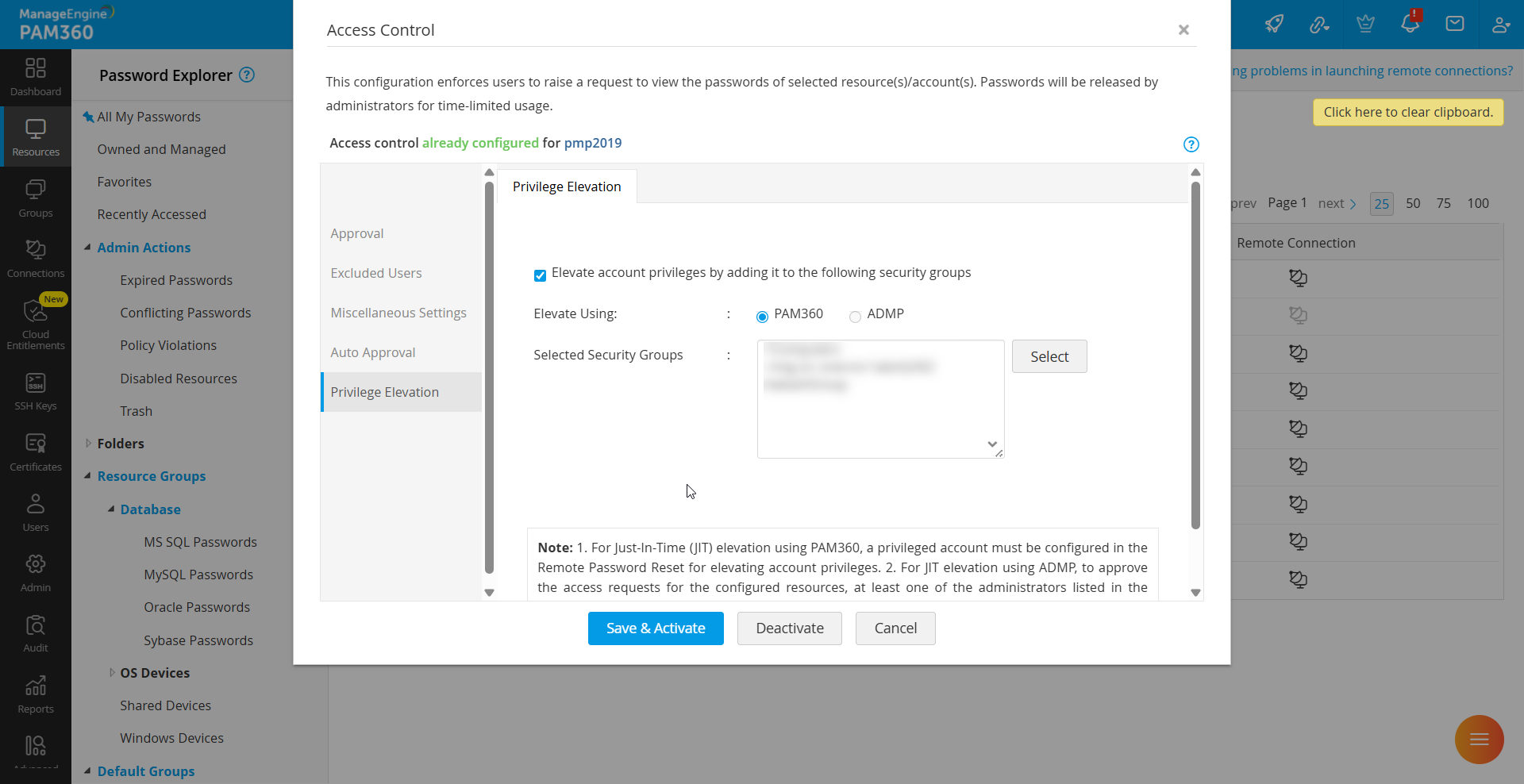
- In the Configure Access Control Window, switch to the Privilege Elevation tab and enable the checkbox Elevate account privileges by adding it to the following local/security groups.
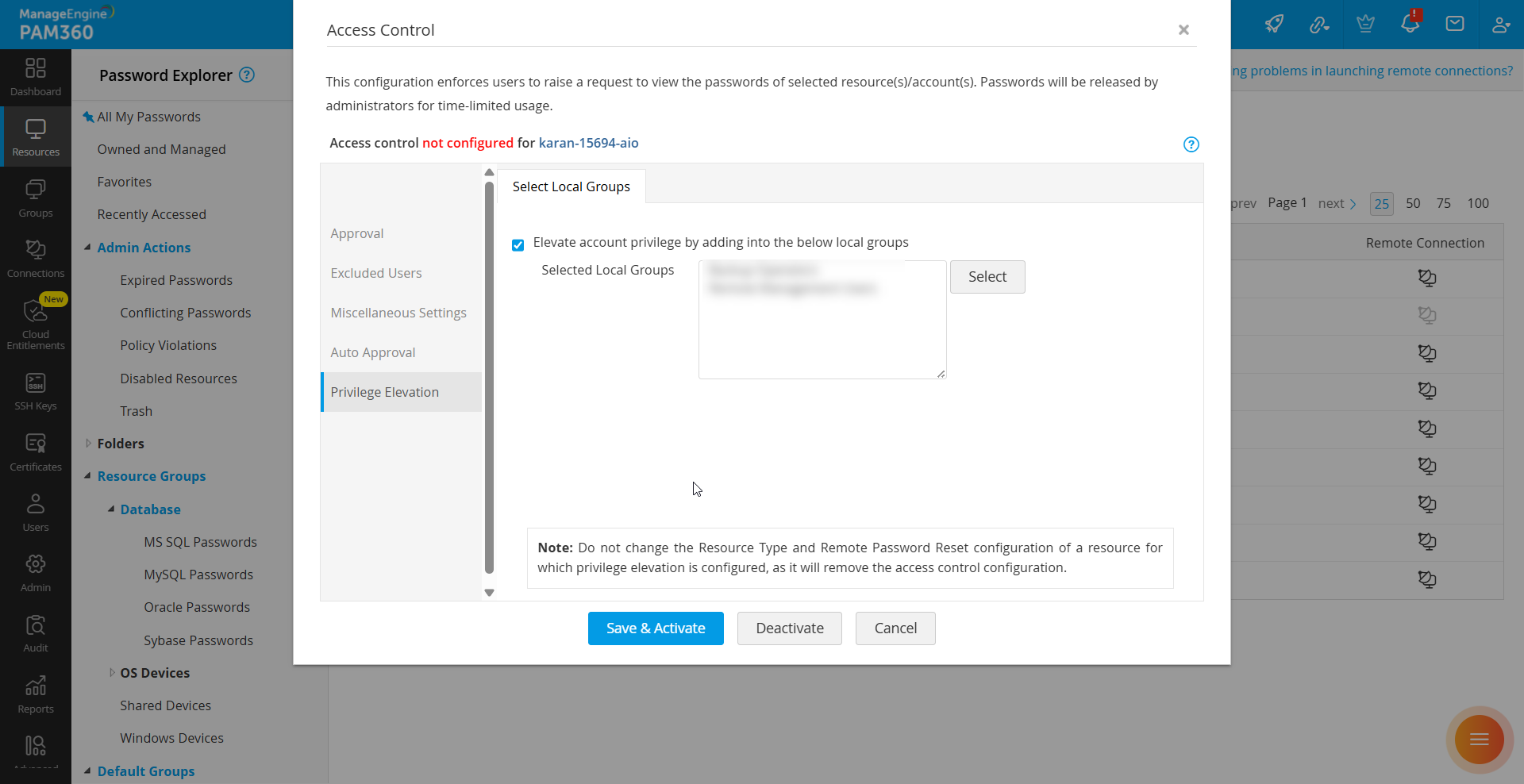
- Click Select to view all available local/security groups for the Windows/Windows Domain resource. The available groups will be displayed in the Select Local/Security Group window. Choose the required groups and click Save. The selected groups will be listed in the Selected Local/Security Groups field.
- Click Save & Activate to successfully configure JIT privilege elevation for the selected resource.
Additional Details
- For builds prior to 7100, configuring privilege elevation for Windows Domain resources requires a valid ManageEngine ADManager Plus integration to fetch the security groups.
- From build 7100 onwards, if you have an active ManageEngine ADManager Plus integration, you can continue using it to configure JIT privilege elevation for Windows Domain resources using the ADMP option. Otherwise, you can continue configuring JIT privilege elevation for Windows Domain resources using the PAM360 option with the above-mentioned procedure.
Additional Details
- Privilege elevation occurs only at the time of password check-out. PAM360 will add the local/domain account to the selected local/security group(s) only when the password of the privileged local/domain account is checked out from the PAM360 repository.
- If privilege elevation fails for an account when PAM360 attempts to add it to the selected group(s), check audit logs for details on the reasons for failure.
- Privilege elevation is not applicable for resource owners and users excluded from the access control workflow.
5. Configuring JIT Privilege Elevation using Local Security Policy
Additional Detail
Enable the checkbox Allow privilege elevation using local security policies via Privileged Task Automation processes in Admin >> Customization >> General Settings >> Password Retrieval to configure JIT privilege elevation using local security policy.
PAM360 enables administrators to configure JIT privilege elevation using local security policies for a Windows resource through access control workflow. Using Privileged Task Automation (PTA), temporary run-time roles and permissions are dynamically provisioned to privileged users only when required. These elevated privileges are automatically revoked at the end of the configured session, ensuring adherence to the principle of Zero Standing Privileges (ZSP). When a user requests access to a privileged account configured with JIT using a local security policy, PAM360 initiates an approval workflow. Upon approval, the user can check out the account password and perform the required tasks with elevated privileges, which are revoked automatically once the password is checked in or the time limit expires.
The below sections explain on configuring JIT privilege elevation using local security policy via PTA processes for the desired Windows resources:
5.1 Configuring PTA for JIT Privilege Elevation using Local Security Policy
Before you initiate the JIT privilege elevation using local security policy configuration, you should first configure PTA in PAM360. Refer to this document for detailed information about the configuration. Once the PTA configuration is completed, follow the below steps to complete the prerequisites required for JIT privilege elevation using local security policy configuration:
- Navigate to Admin >> Workflow Orchestration >> Privileged Task Automation >> Scripts and Bridges. Click Scripts and then add scripts for associating privileges and dissociating privileges separately.
- Here are the sample scripts to be used for privilege elevation and delegation. Scripts can be customized based on the privileges required for the user:
- Now, switch to the Privileged Process tab and create two privileged processes separately by selecting a PowerShell Engine task within the Circuit Builder of PTA. One for associating local security policy privileges, and the other for disassociating the assigned privileges. Make sure that you map the respective script to the privileged task and select the following variables and the respective params (if you are using a sample script as a reference for the process) within the Configuration tab of the circuit builder:
| Variables | Params | Description |
|---|---|---|
TargetMachine | $.TargetMachine | The Windows machine where the privileged user wants to perform the privileged tasks. This machine and the Bridge server should be connected to the same network for seamless execution of the privileged process. |
AdminUser | $.adminAccountName | The administrator account name that is selected for the Windows machine during the Remote Password Reset configuration in PAM360. |
AdminPassword | $.adminPassword | The password of the administrator account that is used during the Remote Password Reset configuration for the target machine. |
UserName | $.UserName | The name of the privileged user who is going to perform the privileged tasks on the target machine. |
For more details on creating privileged processes and mapping scripts, refer to this document.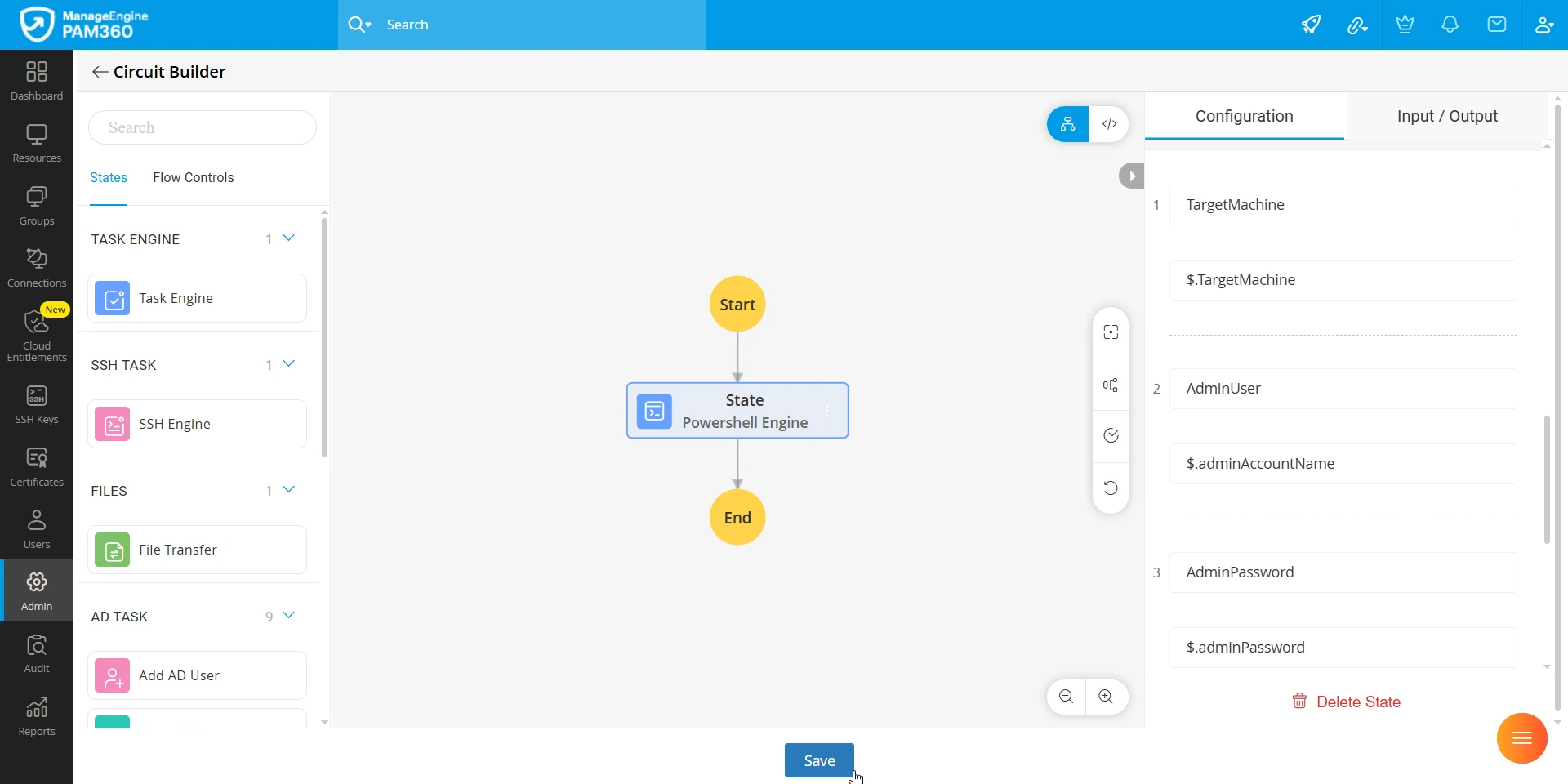
You have now completed configuring PTA. Refer to the next section for configuring JIT privilege elevation using Local Security Policy in the Access Control workflow.
5.2 Configuring JIT Privilege Elevation using Local Security Policy
- Navigate to the Resources tab of your PAM360 account, select the desired Windows resource, and click Configure >> Access Control from the Account Actions menu of the privileged account.
- In the Configure Access Control window, switch to the Privilege Elevation >> Local Security Policy tab and enable the checkbox Privilege elevation using local security policy via Privileged Task Automation processes.
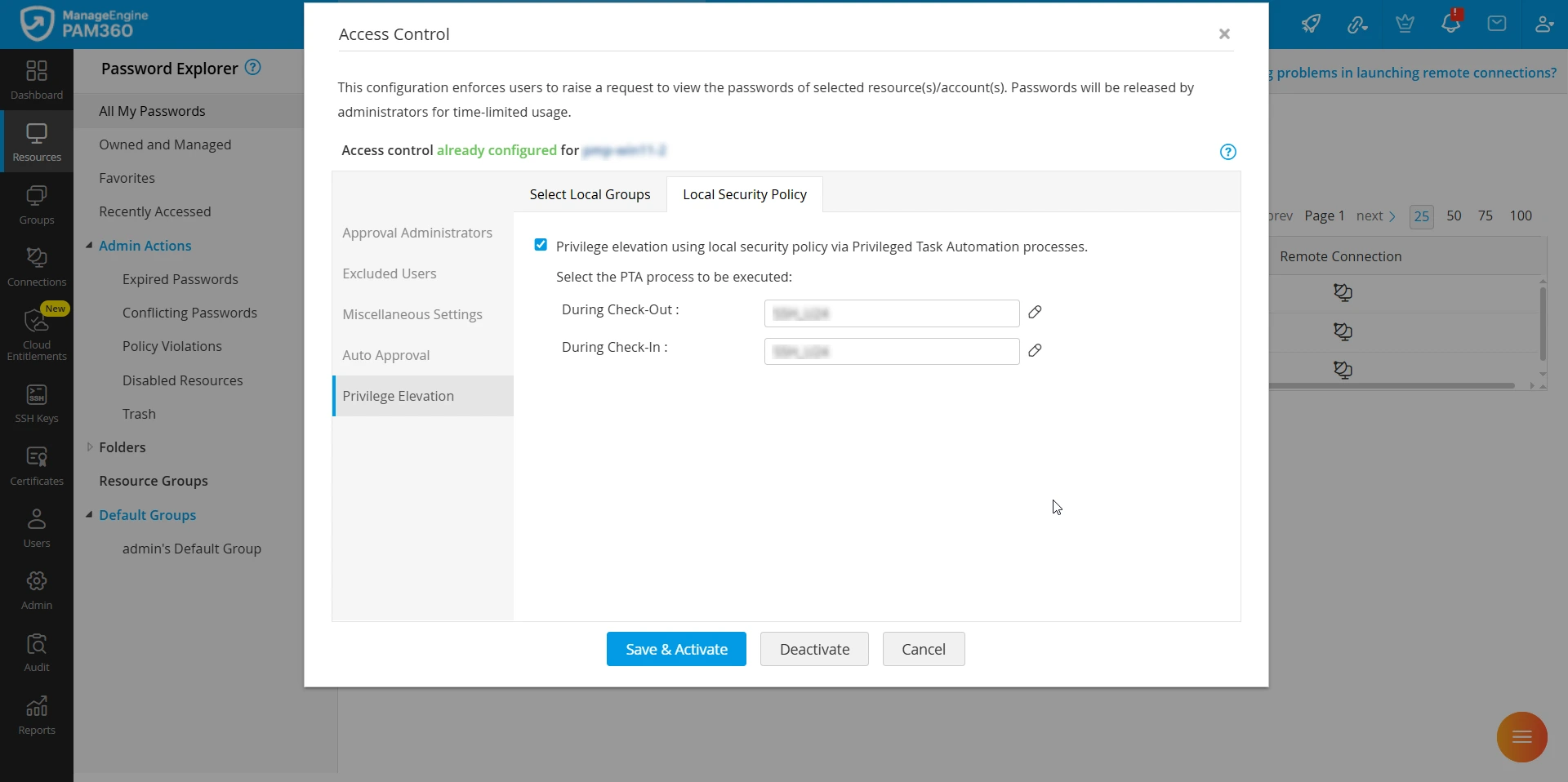
- Select the privilege processes to be executed during Check-In and Check-Out. This will map the privileged processes (created within PTA) and trigger them when a privileged user checks-out and checks-in a password for this privileged account.
- Click Save & Activate to save the configuration.
Additional Details
- To edit the PTA processes to be executed during check-in or check-out for a privileged account configured with privilege elevation using local security policy, open the access control configuration window for the account and navigate to Privilege Elevation >> Local Security Policy. Then, click the Edit icon beside the Check-Out or Check-In dropdown. In case you have edited the process and want to restore it to the previous state, click the Restore icon.
- When approving a password request, administrators can choose to modify the privileged processes that will be triggered during password check-out and check-in. However, they can only assign or edit the processes they own.
You have now completed the configuration for JIT privilege elevation using local security policy for a privileged account on a Windows resource. When a privileged user checks out the password for a configured account, PAM360 automatically triggers the predefined PTA process. This process runs the associated PowerShell script to map the user account to the specified local security policy, granting the required elevated privileges for the approved session. Once the password is checked in, the corresponding check-in PTA process is triggered to disassociate the elevated privileges. This automated flow enables secure, time-bound access without manual intervention, aligning with least privilege principles.