Privileged Task Automation in PAM360
In many organizations, IT administrators routinely perform various privileged tasks, such as system configuration changes, software installations, file transfers, and log management. Manually executing these tasks can be time-consuming, error-prone, and pose security risks due to direct credential exposure.
Privileged Task Automation (PTA) in PAM360, powered by Qntrl, addresses these challenges by enabling the secure, automated execution of privileged tasks across an organization’s IT infrastructure. With PTA, organizations can streamline IT operations, minimize manual intervention, enhance security, and reduce human errors.
Key Benefits of Privileged Task Automation
- Automate privileged tasks to decrease manual effort and mitigate the risk of human errors and security vulnerabilities.
- Execute privileged tasks without directly accessing or managing privileged credentials.
- Enable the seamless execution of privileged tasks requiring high-privilege account credentials within automated workflows.
- Reduce the risk of unauthorized access by securely automating credential-based tasks.
- Log, monitor, and control all task executions within PAM360, ensuring robust governance and regulatory practices.
This document walks you through the following topics:
1. Glossary of Terms
| Term | Definition |
|---|---|
Circuits | A feature powered by Qntrl that enables the automation of privileged processes in PAM360. |
Bridge | A dedicated server that facilitates secure communication between the PAM360 application and Qntrl Circuits. It enables the execution of privileged tasks on endpoints within the user’s network and DMZs. |
Privileged Tasks | A predefined workflow created using circuit states, powered by Qntrl, to execute administrative actions securely. |
Privileged Process | A combination of multiple privileged tasks or a workflow designed to automate specific administrative operations within PAM360. |
Script | A code snippet to overwrite the privileged process with certain inputs based on the user requirements. |
Data Center | A geographically distributed infrastructure that stores, processes, and manages data for cloud services. It ensures high availability, security, and compliance by hosting user data in region-specific locations. This helps improve performance, adhere to local regulations, and enhance data redundancy. |
Client ID | A unique identifier assigned to an application or user when integrating with external services such as Qntrl, ensuring secure authentication and access control. |
Client Secret | A confidential authentication key that is used in conjunction with the Client ID to establish a secure connection between PAM360 and integrated services like Qntrl for privileged task execution. |
2. How Does PTA Work in PAM360?
PTA in PAM360, powered by Qntrl, enables organizations to automate and execute privileged tasks across their IT infrastructure securely. While automation workflows are orchestrated within Qntrl Circuits, they are seamlessly initiated and managed from the PAM360 interface, providing a centralized and integrated experience.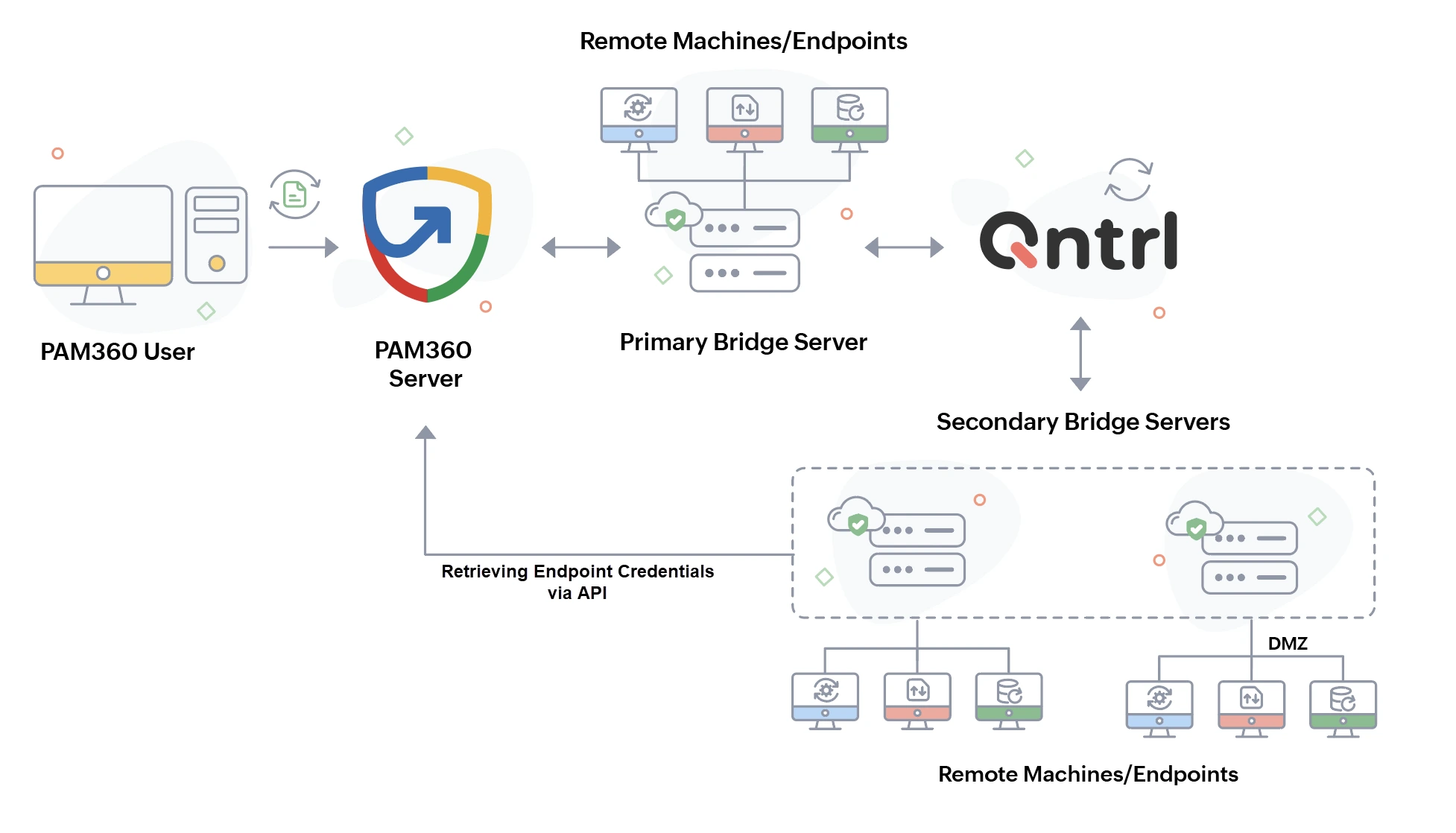
2.1 Role of the Bridge Server
The PTA functionality in PAM360 relies on a Bridge Server, which acts as a secure communication agent between PAM360 and Qntrl Circuits. Installed on a dedicated server within the organization’s network, the Bridge ensures encrypted communication for seamless and secure privileged task execution.
If privileged tasks need to be executed on remote machines that are not directly connected to the primary Bridge Server, an additional Bridge Server can be installed on that network. This supplementary Bridge enables execution in isolated environments while remaining registered with PAM360.
2.2 Privileged Task Automation Workflow
PAM360 enforces a structured and secure automation process through the following steps:
- Task Request Initiation: Users trigger a predefined automation process directly from the PAM360 interface.
- Request Processing: PAM360 forwards the execution request to the Bridge Server, which then communicates with Qntrl Circuits to initiate the workflow.
- Secure Execution: Qntrl Circuits validates the request and assigns the task to the appropriate Bridge Server for execution. If privileged credentials are required, the Bridge Server securely retrieves them from PAM360 using the designated APIs and executes the task on the designated target system.
- Logging & Response Handling: Upon completion, PAM360 logs the execution details for auditing and compliance. The task status and output are then relayed back to PAM360, ensuring complete visibility and traceability.
With PAM360's PTA, organizations can enhance security, streamline IT operations, and maintain compliance by securely automating privileged tasks without direct credential exposure. By leveraging Qntrl Circuits with a secure Bridge Server, PTA provides a scalable, efficient, and risk-free approach to managing privileged operations across enterprise IT environments.
3. Roles Required for Managing PTA in PAM360
There are certain roles required in PAM360 to perform tasks related to the PTA module.
- By default, users with the Privileged Administrator role in PAM360 can perform all PTA-specific operations and audit the relevant actions recorded in the Audit tab. In contrast, other users can only execute the privileged tasks that the Privileged Administrator has explicitly configured and shared with them, except password auditors.
Caution
- Users with the Password Auditor role cannot view the PTA audits completely. However, they can view resources and account audits specific to PTA directly from the Resource Audit tab.
- Unlike other entities, which are fully visible to the Super Administrator, privileged processes owned by other administrators remain restricted. The Super Administrator does not have visibility into these privileged processes unless explicitly shared.
- Apart from the Privileged Administrator role, you can also create a Custom Role with the following privileges enabled to perform tasks related to the PTA module:
- Manage Privileged Process - To create and manage the privileged tasks.
- Execute Privileged Process - To execute the privileged tasks.
Refer to this document to learn more about the process involved in configuring PTA in the PAM360 application.