IIS AppPool Account Password Reset
IIS Application Pools (AppPools) are containers in Microsoft IIS that isolate and run web applications under specific identities, ensuring security, stability, and performance. In an IT environment, IIS AppPools run under an identity. Often, organizations use Windows domain accounts as AppPool identities because those accounts have the required permissions to access resources, such as databases and other services across the domain. When an IIS AppPool is configured to run under a domain account, IIS stores the username and password of that account. The worker process (w3wp.exe) for that AppPool uses those credentials every time it starts.
When a Windows Domain account password is rotated, any IIS AppPools using that account fail to authenticate, as IIS still holds the old password saved in its configuration, leading to application downtime, service failures, or authentication errors in the web apps tied to that AppPool. Whenever a domain account password is reset, PAM360 automatically updates all IIS AppPools using that account with the new password, ensuring the applications run smoothly without the need to update the credentials across multiple servers manually.
This help document covers the following topics in detail:
- Prerequisites
- Workflow
- Configuring IIS AppPool Account Password Reset
- Viewing IIS AppPool Account Status
1. Prerequisites
Ensure the following prerequisites are met on the target Windows servers where the AppPools are running:
- Microsoft .NET Framework 4.5.2 or above
- Microsoft Visual C++ 2015 Redistributable
- REMCOM.exe - To remotely execute commands on the target server.
These components are required for PAM360 to establish secure connections with the target servers and successfully update the IIS AppPool configuration when the associated domain account passwords are reset.
2. Workflow
When a password reset operation is initiated for a domain account associated with IIS AppPools, PAM360 identifies all AppPools across the relevant member servers, establishes secure connections with these servers, updates the stored credentials in the worker process (w3wp.exe) for those AppPools with the new password, and verifies synchronization.
To ensure this process runs seamlessly, you should add the member servers where the AppPools are running to a resource group and associate the resource group with the domain account. This allows PAM360 to automatically update the stored credentials in the worker process for those AppPools whenever the domain account password is reset.
Before you proceed with associating the resource groups containing the member servers where the IIS AppPools are running with the domain account, ensure that the following configurations are already in place:
- The domain controller is added as a Windows Domain resource in PAM360. If not, add the domain controller as a resource by following the steps provided in this link.
- Add the domain admin account credentials used by AppPools to the Windows Domain resource. Explore this link for detailed steps to add accounts to a resource.
- All the member servers where the IIS AppPools are running are added as resources in PAM360.
- Remote password reset is configured for the Windows Domain resource. Explore this link for detailed steps to configure remote password reset for a Windows Domain resource.
- All the member servers are added to a static resource group. Explore this link to add the resources to a static group.
3. Configuring IIS AppPool Account Password Reset
Follow these steps to associate the resource groups containing the member servers where the IIS AppPools are running with the domain account to automatically update the stored credentials in the worker process when the domain account password is reset:
- Navigate to the Resources tab and click on the Windows Domain resource.
- In the Account Details window that appears, click the Account Actions icon beside the domain account under whose identity the IIS AppPools are running, and select Edit Account from the displayed options.
- In the Edit Account window that appears, under Associate resource group for this service account, click on the resource groups containing the member servers where the IIS AppPools are running, and click the right arrow button.
- Enable the checkbox under the Reset column beside the IIS AppPool to automatically update the passwords on the worker process when the domain account password is reset.
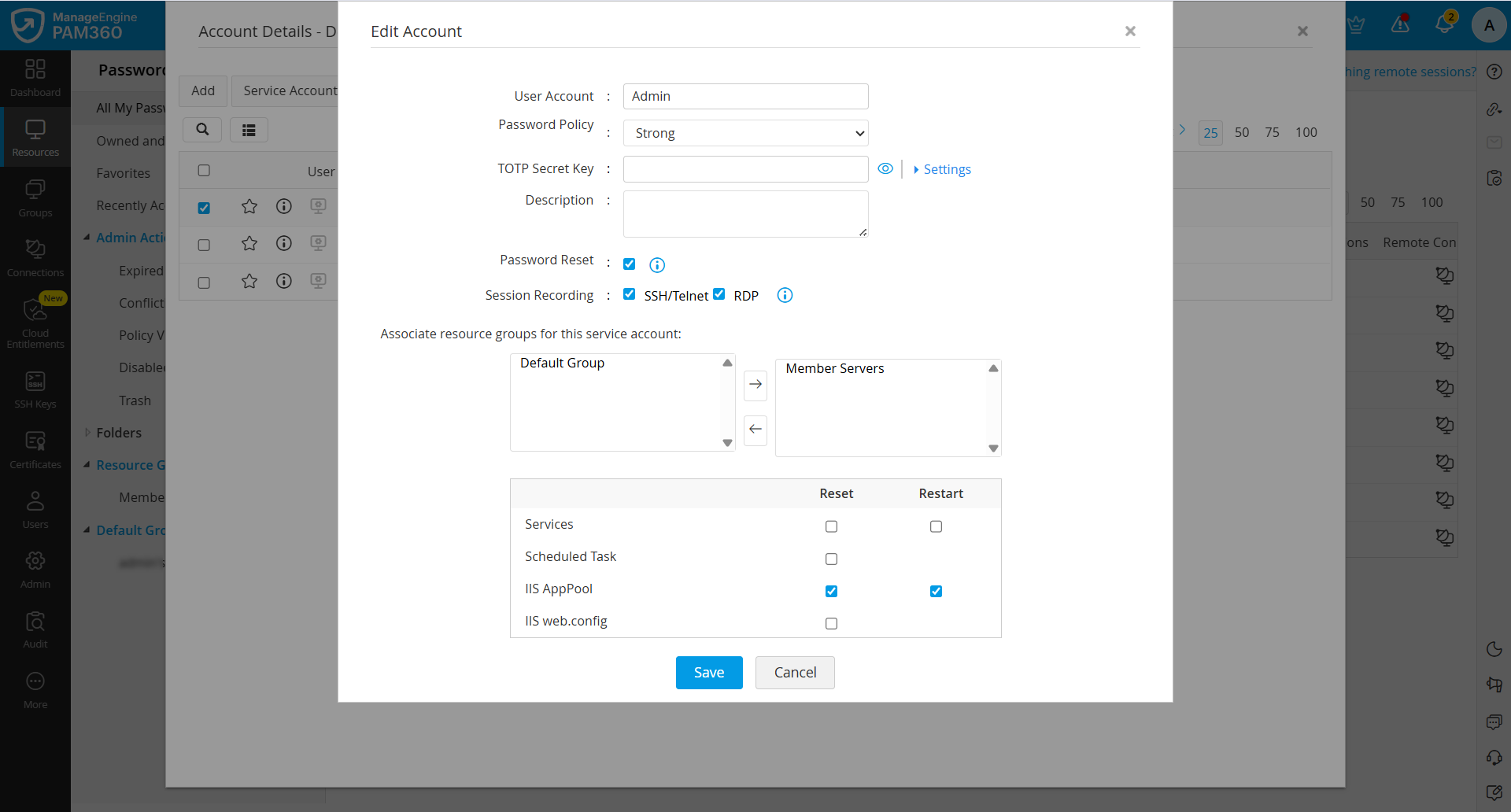
- Enable the checkbox under the Restart column beside IIS AppPool if you want PAM360 to restart the AppPools immediately after their passwords are updated in the worker process.
- Click Save to save the configured changes.
4. Viewing IIS AppPool Account Status
For any Windows Domain account, you can view a list of all associated IIS AppPools and information about the status of password update upon domain account password reset.
- Navigate to the Resources tab and click on the Windows Domain resource.
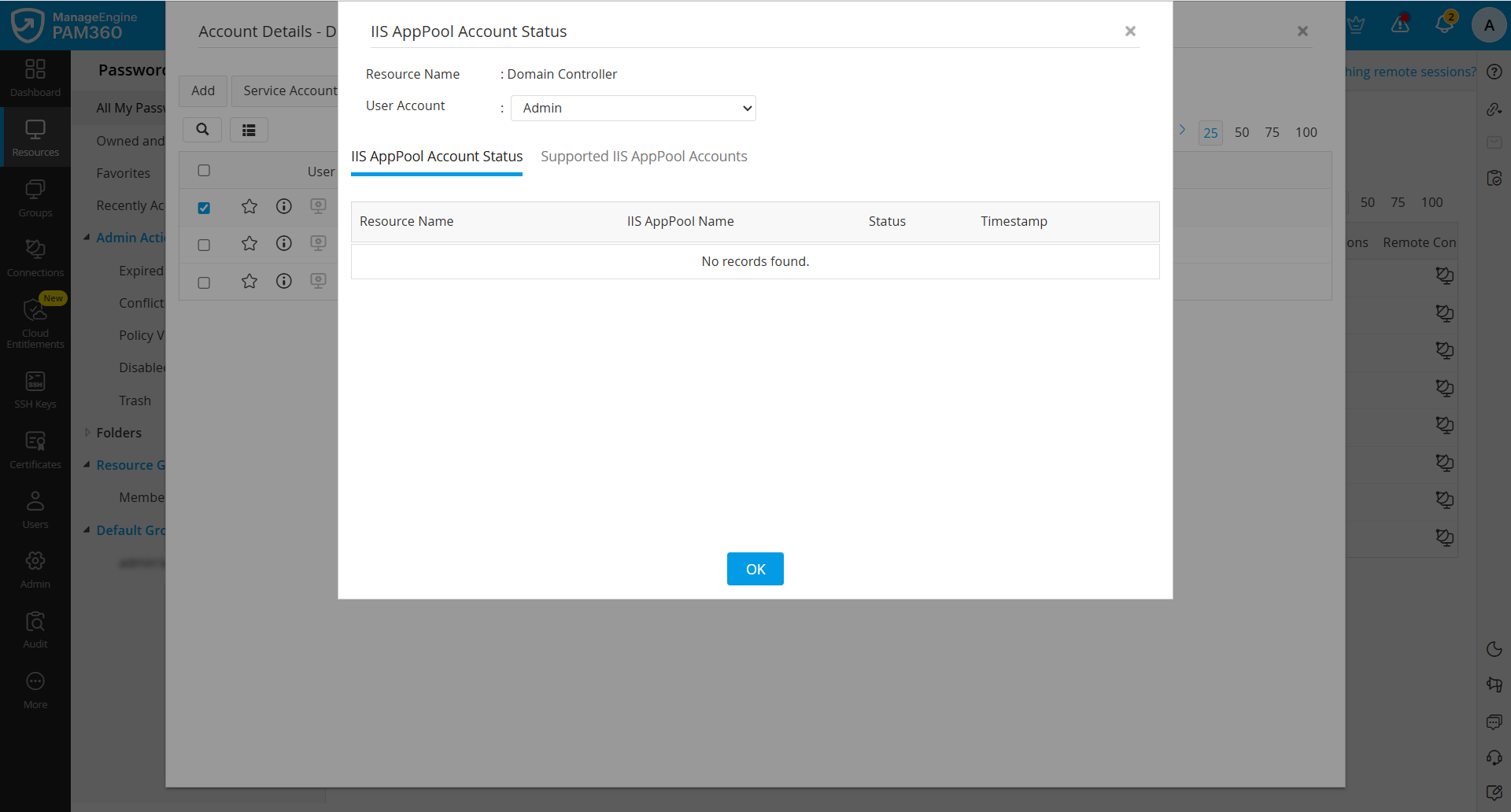
- In the Account Details window that appears, tick the checkbox beside the domain account associated with the IIS AppPools, and click the IIS AppPools button in the top pane.
- In the window that appears, you will see the selected resource and account names. Switch to the IIS AppPool Account Status tab, where you will see a list of all IIS AppPools associated with the selected domain account, along with relevant information such as the name of the IIS AppPool, the resource with which it is associated, its status, and timestamp.
Additional Detail
If you have created schedules for rotating the domain account passwords, the IIS AppPool account password reset will also follow the configured Windows Domain account password reset schedule.