Configure KerioControl Firewalls
Firewall Analyzer supports KerioControl Firewall: 9.2 and earlier, later versions.
Configuring KerioControl FIrewall
- Connect the KerioControl Web UI.
- Navigate to Logs page.
Below list of logs will be shown in logs page:
| Log | Severity |
| Alert | 1: Alert |
| Config | 6: Informational |
| Connection | 6: Informational |
| Debug | 7: Debug |
| Dial | 5: Notice |
| Error | 3: Error |
| Filter | 6: Informational |
| Host | 6: Informational |
| HTTP | 6: Informational |
| Security | 5: Notice |
| Warning | 4: Warning |
| Web | 6: Informational |
- Click every log page and right click. Log Settings option will show.
- Click Log Settings option.
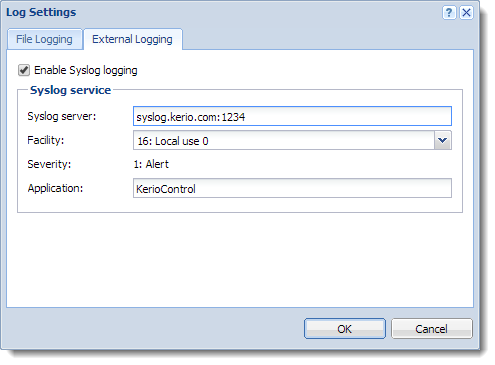
- In Log Settings page, Click External Logging.
- Select Enable Syslog logging.
- Syslog service:
- Syslog server > Firewall Analyzer IP Address
- Facility > 16:Local use 0
- Severity > By default, it will be selected.
- Application > KerioControl
Reference:
https://manuals.gfi.com/en/kerio/control/content/logs/using-and-configuring-logs-1461.html
Thank you for your feedback!