Configure Zyxel Firewalls
Firewall Analyzer supports Zyxel firewal versions ZLD 4.25 or higher
Configure Zyxel Firewalls
Configure Zyxel device to forward syslog data to Firewall Analyzer.
- Log into the Zyxel Web Interface.
- Navigate to Configuration > Log & Report > Log Settings.
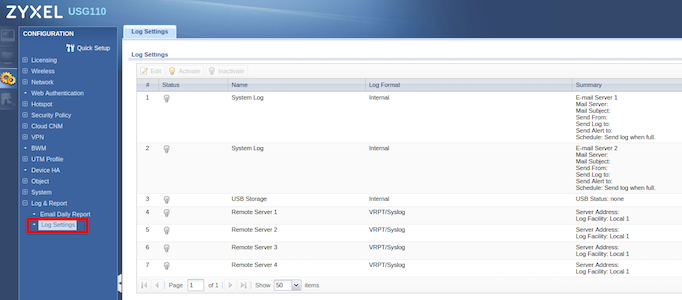
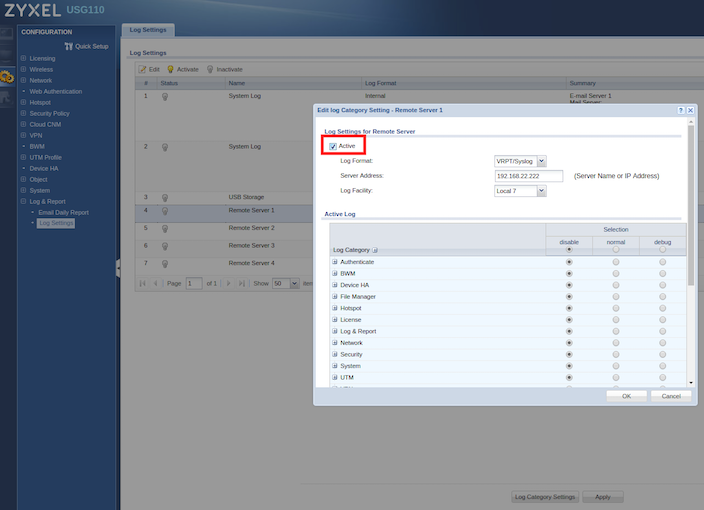
- Choose a Remote Server.
- Click Active.
- Choose Log Format as VRPT/Syslog.
- Enter the IP address of the Firewall analyzer in Server Address field.
- Select Local 7 in Log Facility field.
- Select the Categories you want to be logged (normal = default logs, debug = very detailed logs, disable = no logs)
Troubleshooting:
Default syslog server port is 514, If you want to change it, please refer the document given in the below link:
https://kb.zyxel.com/KB/searchArticle!gwsViewDetail.action?articleOid=015123&lang=EN
Thank you for your feedback!