Integrating PAM360 with ManageEngine ServiceDesk Plus
ManageEngine PAM360 integrates with ManageEngine ServiceDesk Plus (SDP), a web-based Help Desk and Asset Management software. Organizations use help desk software such as the SDP to deliver customer service and manage their internal IT perfectly.
Technicians using SDP often need to access target machines (or resources) manually to resolve issues, which involves security-related challenges, such as sharing sensitive passwords for authentication, etc., especially while using the privileged accounts. They also had the pain of jumping between machines to perform different tasks. With this integration, accessing the remote systems from the ServiceDesk Plus portal is just a click away for the Technicians. Administrators can now provide the advantage of secure remote access to the target machines (or resources) only to the authorized Technicians without sharing the credentials. The Technicians can remotely access the target endpoints (or resources) from the ServiceDesk Plus portal without having to log in to PAM360 each time to fetch the credentials.
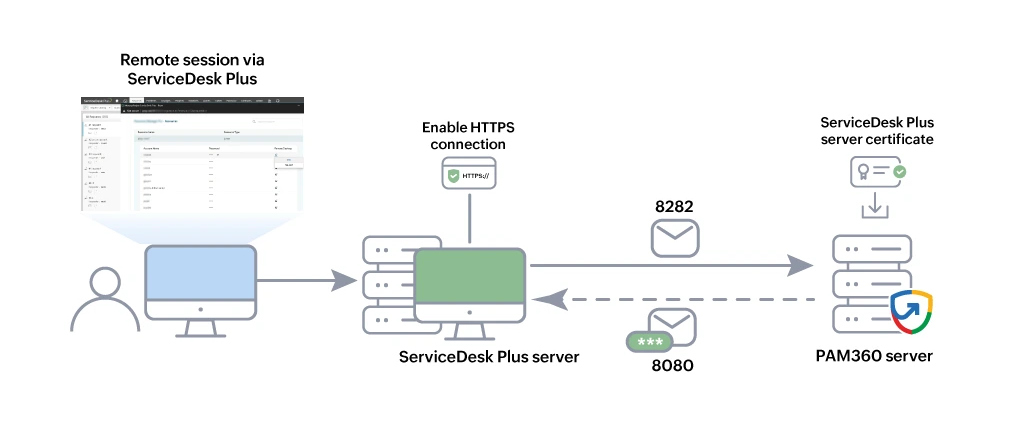
The following topics are discussed in this document:
- Prerequisites
- Configuring ServiceDesk Plus
- Viewing Configuration Details
- How Do Technicians Benefit from the Integration?
1. Prerequisites
Before commencing the integration, verify if all of the below prerequisites are satisfied:
- All the configurations related to the PAM360-SDP integration can be done from the SDP portal. Hence, make sure you have access to an active SDP portal.
- The SDP Technician should also be a PAM360 user, with the same username in both the applications. Using Active directory integration will ensure that the same username is present in both the products.
- PAM360 should be accessible from the server on which SDP is running. To verify this, try launching your PAM360 web-client from the SDP server.
- The Authentication token (i.e. Auth Token) generated during the integration process is specific to your ServiceDesk Plus instance, and will be displayed only once. Hence, make sure you copy the Auth Token as you need to paste it in the required field in the PAM360 portal.
2. Configuring ServiceDesk Plus
All the configurations related to the PAM360 - ServiceDesk Plus integration can be performed from the ServiceDesk Plus console only. Refer to this ServiceDesk Plus help document for more details.
Caution
From ServiceDesk Plus build 13000 onwards, it is required to deploy the PAM360's SSL certificate in the SDP installation directory to complete the integration process. Follow these steps to complete the SSL certificate deployment process.
From the PAM360 console, you can view the configuration details and regenerate the AuthToken. Once you have finished configuring the integration, you will be able to access the accounts in target endpoints remotely (or resources) without having to enter the credentials.
Caution
- If the integration is not successful, first verify if the server is reachable. Then, follow the below steps:
- Navigate to the <PAM360-Installation-Directory>/logs folder and open the pam0 file.
- Search for remoteHost in api filter and try pinging the value/IP address corresponding to it.
- If the server is not reachable using the IP address, then determine the correct IP/DNS, using which you can ping the server from the PAM360 installation machine.
- If the problem persists, please contact PAM360 support.
- ServiceDesk Plus does not support launching remote sessions to resources for which Remote App-only access is enabled in PAM360.
3. Viewing the Configuration Details
After completing the integration in the ServiceDesk Plus portal, you can view the configuration details from the PAM360 console. To do so, navigate to Admin >> Integrations >> ManageEngine. In the Integrations | ManageEngine page that appears, you will see the ServiceDesk Plus integration status respectively. Click the Edit button to view the configuration details. In the ServiceDesk Plus Integration dialog box that appears, you will be able to do the following:
- View the configuration details that include:
- Auth Token: The available Auth Token will be hidden and you will see only a "Auth Token Available" message in this field.
- Host Name: The DNS name of the machine, where ServiceDesk Plus is hosted.
- Port Number: The port number on which ServiceDesk Plus is listening.
- Click the Regenerate button to generate a new Auth Token.
- Click Update to save the changes.
You can generate any number of Auth tokens from here. This option comes handy if you have lost the Auth Token that was generated during the initial configuration process. Whenever you generate a new Auth token, click Update for the change to take effect.
4. How Do Technicians Benefit from the Integration?
After completing the integration and configuring the required actions in the ServiceDesk portal, you can access the PAM360 web interface and view the resources using the Custom Actions menu on the Request Details page as shown below: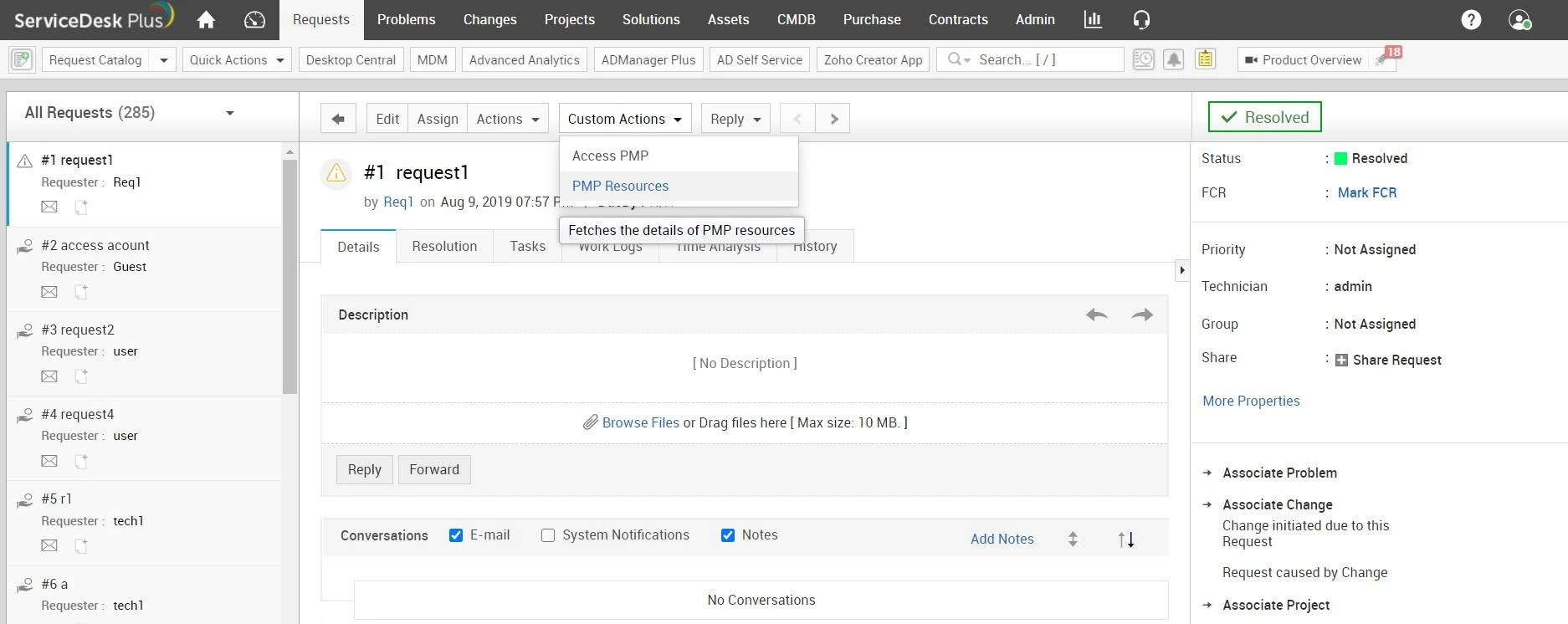
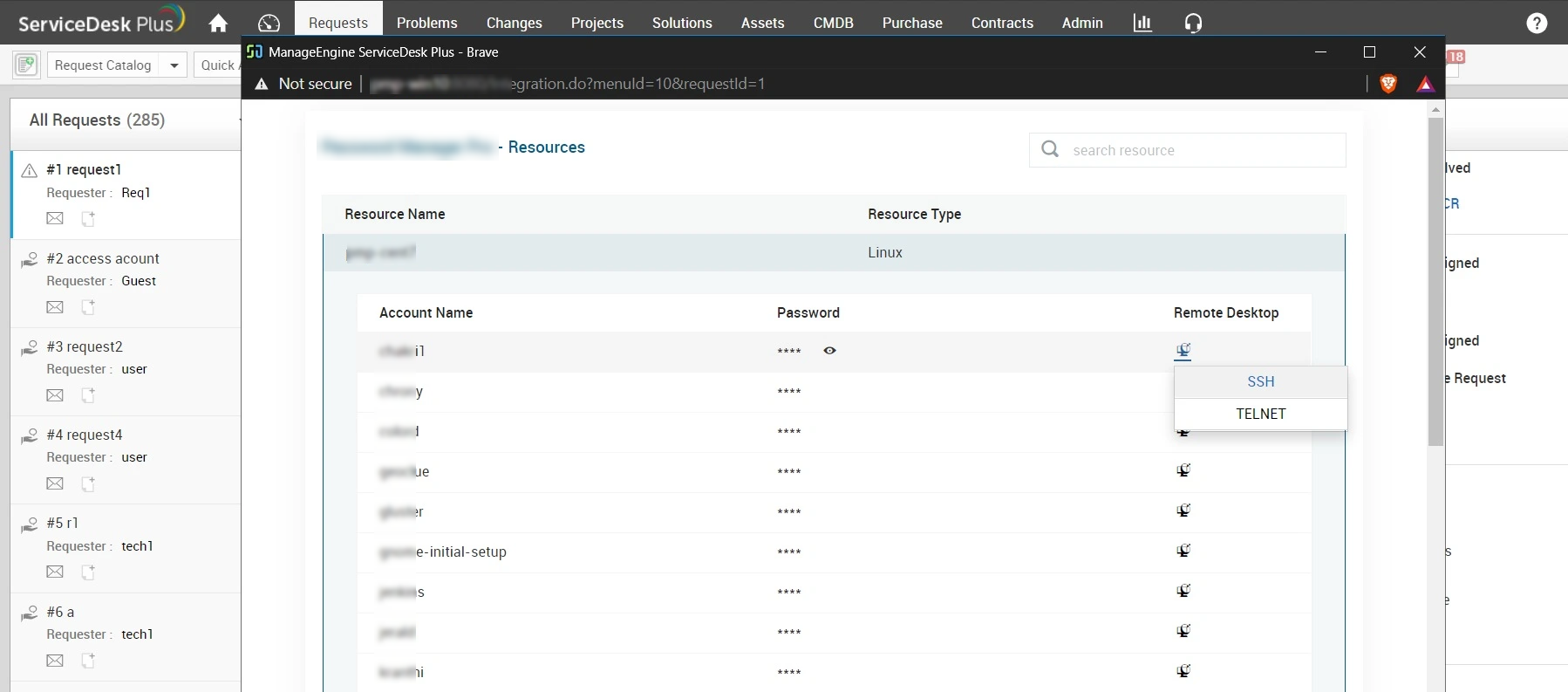
Using these options, the Technicians can remotely access the Windows server via RDP, and Linux and Mac machines over Telnet or SSH.