How to Configure ServiceNow with NetFlow Analyzer?
You can configure NetFlow Analyzer to automatically log a ticket in ServiceNow whenever the defined threshold is violated. Similar to notifications received via email or SMS or chats, logging a ticket will help you keep track of all the issues.
There are two steps that are required to successfully add the Service Now profile to the NetFlow Analyzer.
- To integrate the Service Now profile with NetFlow Analyzer
- To configure a notification profile in the NetFlow Analyzer for logging a ticket in the Service Now
Integrating a ServiceNow profile
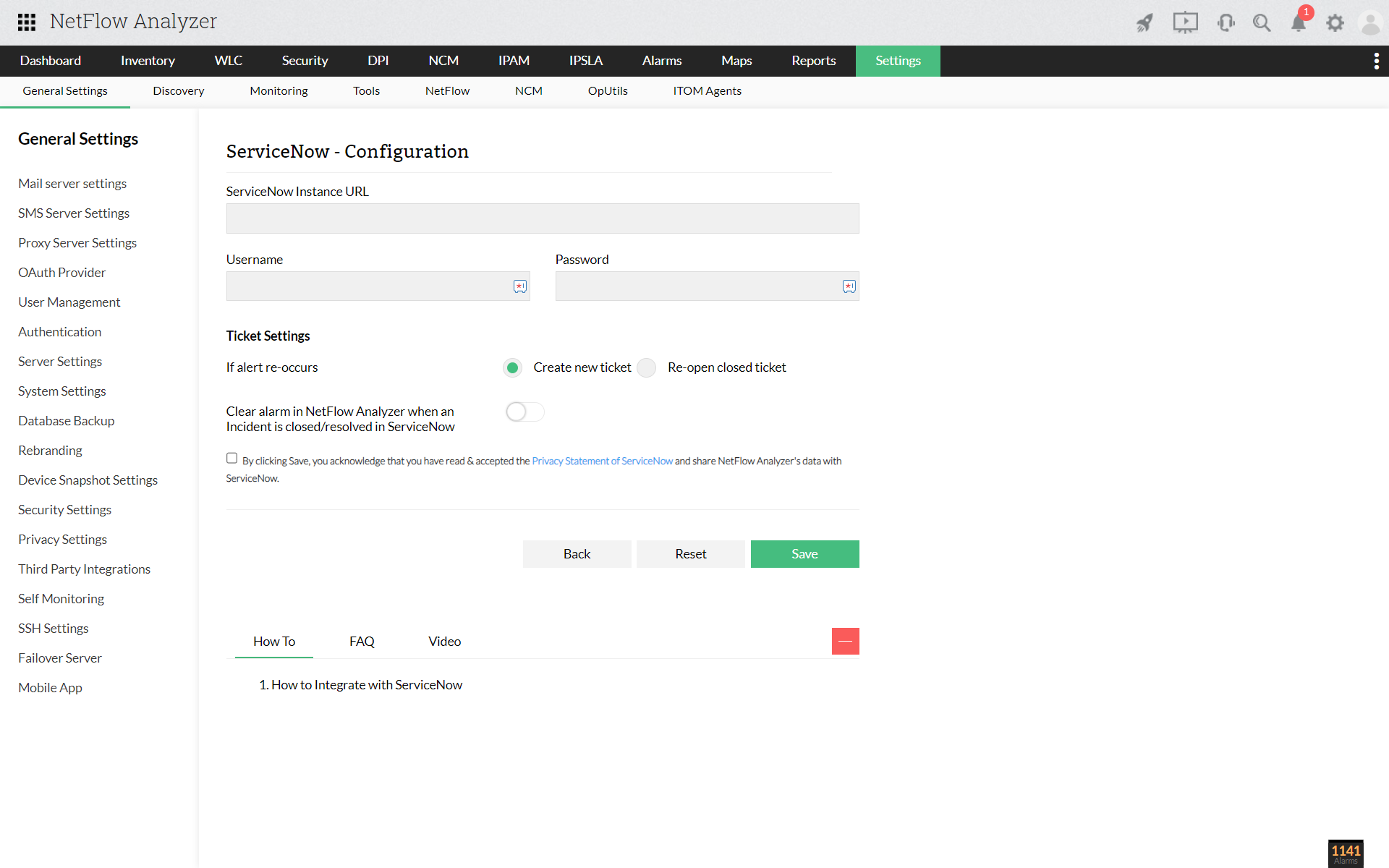
- Go to Settings → General Settings → Third Party Integrations → ServiceNow
- Enter your Service Now account's URL, user name and password
- Ticket settings
- You can configure how to get notified when the same alert reoccurs
- If an alert re-occurs, you can choose the option to either Create new ticket or Re-open closed ticket. Selecting the former option allows you to get the issue/alert raised as a new ticket, while the latter will re-open the resolved ticket of the respective alert in ServiceNow
- You can enable or disable the option Clear Alarm in NetFlow Analyzer when an Incident is closed/resolved in ServiceNow to clear the alarm when that incident has been taken care of or closed in ServiceNow
- Then Save the configuration
Thank you for your feedback!