What is promptActionID ?
While executing some commands, the terminal might display prompts that disrupt the flow of operation. These prompts have to be manually responded to to resume the command execution, while operating through a Telnet or PuTTY terminal. But when tasks are being executed directly from the GUI of Network Configuration Manager, responding to these prompts is a challenge.
Using promptActionID in Network Configuration Manager, admins can ensure that the flow of the task continues, irrespective of the prompts that appear.
Let's look at the "show config" command as an example. The size of configuration file might be too long to fit into a single window. In such cases, we see a prompt like "--More--", to view the rest of the configuration commands. During manual execution of commands, the "--More--" prompt can be responded to by hitting "Enter"
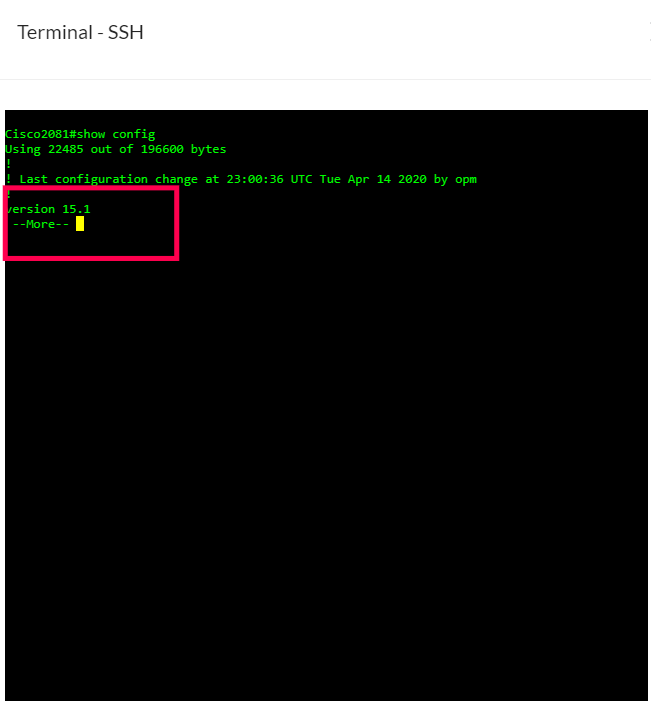
And Using Network Configuration Manager GUI, users can automate the response to such prompts for every device type. Users can go and associate prompts with promptActionID in the device templates. Now, everytime the ""--More--"" prompt appears, the solution will respond by executing the command of the associated promptActionID and ensure the flow of the command execution is uninterrupted.
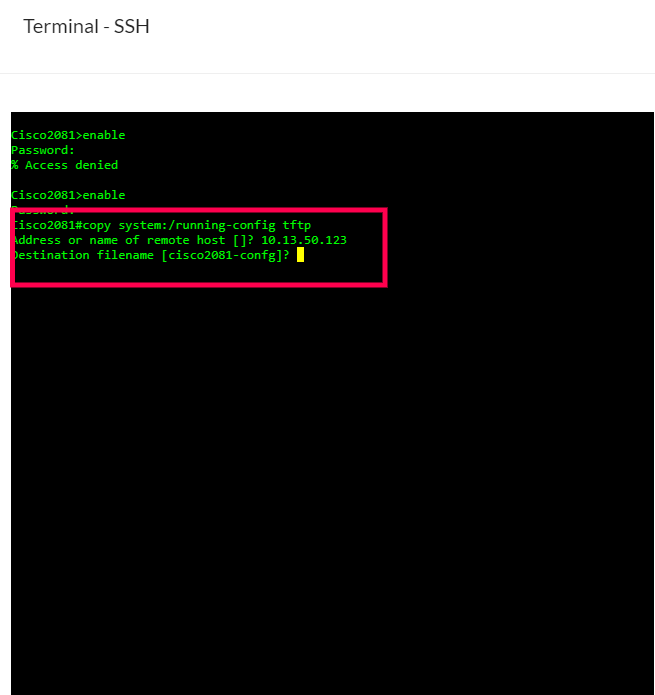
The above image shows the prompt "]?" in terminal.When the command "copy system:/running-config tftp" is executed , it asks for remote host(device address) and the host address will be automatically fetched.
Network Configuration Manager then checks if the "]?" prompt has be configured with a promptActionID, in the device templates. If a promptActionID has been associated, the corresponding command is executed. If not, the command execution stops and would need the user to manually respond through the terminal.
Below is a list prompts their corresponding promptActionIDs and commands . If the prompt you require is listed, you can select one of the corresponding promptActionID.
If the prompts you are looking for aren't listed here, you can get in touch with us.
Prompt VS PromptID
| S.No | Prompt | PromptID | command |
|---|---|---|---|
| 1 | [confirm] | yesActionId | LF |
| ImageDownloadPromptAction1 | |||
| ImageDownloadPromptAction2 | |||
| scriptExecutionActionId | |||
| 2 | [yes/no] | yesActionId | yes followed by LF |
| ImageDownloadPromptActioni2 | |||
| scriptExecutionActionId | |||
| 3 | y/n | yesActionId | y |
| scriptExecutionActionId | y followed by LF | ||
| AlaxalaActionId | |||
| BrocadeActionId | |||
| Alaxala1230ActionId | y followed by CR and LF | ||
| hitachiActionId | |||
| 4 | yes/no | yesActionId | yes followed by LF |
| scriptExecutionActionId | |||
| 5 | [y/n] | hpActionId | y |
| 6 | [y/n] | RadwareActionId | n followed by LF |
| 7 | (y/n) | HirschmannSwitchActionId | y followed by LF |
| DellActionId | |||
| 8 | [Y/N] | H3CSwitchActionId | Y followed by LF |
| 9 | [Y/N] | 3comActionId | y followed by CR and LF |
| 10 | (y/N) | CiscoWLANControllerActionId | y followed by LF |
| 11 | (y/n) ? | nortel8600ActionId | y followed by LF |
| 12 | (y/n) [n]? | catOSActionId | y followed by LF |
| 13 | (yes,no) [no] : | 3comActionId | yes followed by CR and LF |
| 14 | ?[Yes | dlinkActionId | y(y) |
| scriptExecutionActionId | |||
| 15 | (YES): | packerShaperActionId | yes followed by CR and LF |
| 16 | [Y]> | IronportId | y followed by LF |
| 17 | No]): | necActionId | y followed by CR and LF |
| 18 | [y] | FiberhomeId | y |
| 19 | ]? | LF | y |
| scriptExecutionActionId | |||
| EnterasysActionId | y followed by LF | ||
| 20 | continue | hpActionId | LF |
| scriptExecutionActionId | |||
| 21 | Continue -> | CiscoVPNConcentratorActionId | q (q) |
| 22 | continue.... | CiscoWLANControllerActionId | LF |
| 23 | continue | nortelPPActionId | $32 (hex Value) |
| RadwareActionId | |||
| 24 | All | dlinkActionId | a (a) |
| 25 | Allllaa | scriptExecutionActionId | |
| 26 | completed | yesActionId | LF |
| 26 | done. | foundryActionId | CR and LF |
| scriptExecutionActionId | |||
| 28 | Done. | H3CSwitchActionId | LF |
| 29 | OK | TransPortWirelessrouterId | CR and LF |
| 30 | --More-- | yesActionId | $32 (hex value) |
| foundryActionId | |||
| nortelPPActionId | |||
| EnterasysActionId | |||
| CiscoWLANControllerActionId | |||
| NortelContivityActionId | |||
| RadwareActionId | |||
| scriptExecutionActionId | |||
| 31 | -- More -- | yesActionId | |
| scriptExecutionActionId | |||
| 32 | ---(more)--- | yesActionId | |
| scriptExecutionActionId | |||
| 33 | --- more --- | yesActionId | |
| netscreenActionId | |||
| scriptExecutionActionId | |||
| 34 | ---MORE--- | yesActionId | |
| 35 | ---more--- | yesActionId | |
| 36 | -- MORE -- | hpActionId | |
| scriptExecutionActionId | |||
| CanogaPerkinsActionId | |||
| 37 | ----More | scriptExecutionActionId | |
| 38 | next line : | hpActionId | |
| scriptExecutionActionId | |||
| 39 | notes: | 3comActionId | Config backed up by NCM follwed by CR and LF |
| 40 | TFTP Server: | hpActionId | LF |
| 41 | Press any key to continue (Q to quit) | AlaxalaActionId | CR and space |
| AlaxalaActionId | |||
| Alaxala1230ActionId | |||
| scriptExecutionActionId | |||
| 42 | enter key): | H3CSwitchActionId | LF |
| 43 | [Yes/ press any key for no].... | DellActionId | y followed by LF |
| 44 | File uploaded successfully | H3CSwitchActionId | LF |
| 45 | saved configuration successfully | H3CSwitchActionId | LF |
| 46 | byte | AlaxalaActionId | LF |
| scriptExecutionActionId |
Thank you for your feedback!