Integration with Trusted Public Certificate Authorities
Maintaining a threat-free network requires much more than just securing your domains with SSL certificates. For organizations that deal with a large SSL environment, the process of purchasing, deploying and renewing SSL certificates often proves to be cumbersome, time-consuming and has hardly been straightforward. Oversight, manual errors, improper configuration, weak ciphers, and expiration often lead to downtimes, compliance issues and security breaches. Certificate life-cycle management is a practice that streamlines the certificate management process by automating acquisition, issue, deployment, re-issue, renewal, and revoking of certificates.
PAM360 facilitates end-to-end life cycle management of certificates issued by public certificate authorities. This functionality, powered through seamless API integration with third-party certificate authorities, allows administrators to request, acquire, consolidate, deploy, renew, and track the life cycles of certificates in a centralized fashion directly from the PAM360's web interface.
Additional Details
- While PAM360 leverages the open APIs of Let's Encrypt and GoDaddy to establish a connection, the tie-in with rest of the certificate authorities is powered through an integration with The SSL Store, a platinum partner of the certificate authorities.
- You can augment PAM360 with additional ACME providers alongside established third-party certificate authorities like Let's Encrypt, Buypass Go SSL, and ZeroSSL, enabling automated certificate life cycle management.
Below are the public certificate authorities supported by PAM360. Click on the provided links below for more details on integrating the desired public CAs with PAM360.
- Let's Encrypt
- GoDaddy
- The SSL Store (Thawte, RapidSSL, Geotrust, Sectigo [formerly Comodo CA])
- DigiCert
- GlobalSign
- Buypass Go SSL
- ZeroSSL
- AWS-ACM
- Azure Key Vault
- Sectigo Certificate Manager
The flow diagram given below provides a quick overview of how the integration works and the necessary steps to acquire and manage the certificates issued by the public certificate authorities using PAM360.
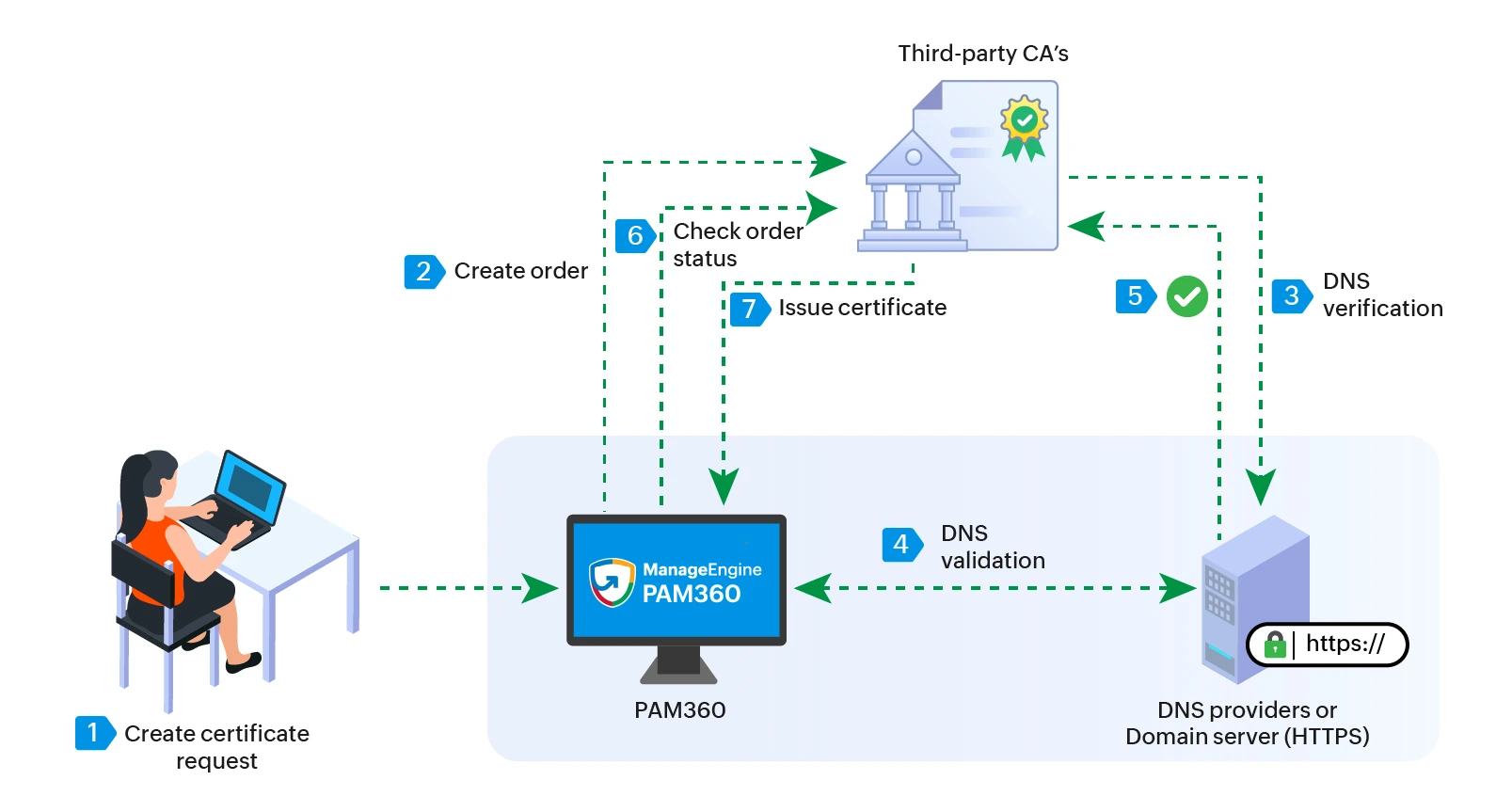
The integration process involves the following steps:
- Once the public CA is configured in PAM360 with the appropriate credentials, users can initiate the certificate request process (certificate ordering) by providing the required Certificate Signing Request (CSR) details through PAM360.
- PAM360 creates a certificate order and submits the request to the configured Certificate Authority.
- The Certificate Authority processes the request and performs the necessary domain validation to verify domain ownership as part of its approval workflow.
- After the domain ownership is successfully validated, the Certificate Authority approves the request and issues the certificate to PAM360.
- When the order status is checked, the certificate is automatically added to PAM360’s SSL repository and can be managed from the Certificates tab.
- Administrators can then deploy the certificate to the appropriate domain servers directly from PAM360 and mange them accordingly.
This streamlined workflow simplifies the acquisition, management, and deployment of public CA-issued certificates within your infrastructure.