Windows Service Account Password Reset
Windows Service Accounts are accounts used by system programs to run application services or processes. Unlike regular user accounts, these accounts often hold elevated privileges, making them highly sensitive to compromise. As many third-party services, scheduled tasks, or processes may share a service account, dependencies can become complex and risky if not properly managed.
In most enterprise environments, designated Windows domain accounts are configured for Windows services that require network access. PAM360 simplifies the management of such accounts by automatically discovering the services associated with a domain account. When the password of a domain account managed in PAM360 is rotated, PAM360 identifies all the services tied to that account and updates the service account password automatically.
In certain scenarios, a service restart is required for the rotated password to take effect. PAM360’s Windows service account password reset feature automates this entire process, ensuring that critical services continue to function seamlessly while enforcing secure password practices.
This help document covers the following topics in detail:
1. Prerequisites
Ensure the following prerequisites are met on the target Windows servers where the services are running before utilizing the Windows Service Account Password Reset feature in PAM360:
- Software Requirements
- Microsoft .NET Framework 4.5.2 or above
- Microsoft Visual C++ 2015 Redistributable
- Additionally, ensure the following services are running:
- Windows RPC service
- Windows Management Instrumentation (WMI) service - WMI connectivity from the PAM server to member servers and domain controllers
These components are required for PAM360 to establish secure connections with the target servers and successfully update service account configuration when the associated domain account passwords are reset.
2. Workflow
When a domain account password is rotated, PAM360 automatically detects all Windows services running under that account across the associated member servers. It then establishes secure connections with each server, updates the stored credentials in the Windows Services Control Manager (SCM) with the new password, and restarts or synchronizes the services to ensure the changes are applied successfully.
To ensure this process functions seamlessly, add all the member servers where the associated services are running to a static resource group, and associate this resource group with the corresponding domain account. This setup allows PAM360 to automatically update the credentials of all associated Windows services whenever the domain account password is reset.
Before you proceed with associating the resource groups containing the member servers where the service accounts are running with the domain account, ensure that the following configurations are already in place:
- The domain controller is added as a Windows Domain resource in PAM360. If not, add the domain controller as a resource by following the steps provided in this link.
- Add the domain admin account credentials used by services to the Windows Domain resource. Explore this link for detailed steps to add accounts to a resource.
- Remote password reset is configured for the Windows Domain resource. Explore this link for detailed steps to configure remote password reset for a Windows Domain resource.
- All the member servers where the service accounts are running are added as resources in PAM360.
- All the member servers are added to a static resource group. Explore this link to add the resources to a static group.
Additional Details
- PAM360 will fetch the service accounts associated with the services running on domain member servers during the privileged accounts discovery process. Click here to learn more about Windows Service Account discovery in PAM360.
- When the password of a managed domain account is reset, PAM360 iterates through the associated resource groups to identify the list of services using that account.
3. Configuring Service Account Password Reset
Follow these steps to associate the resource group containing member machines where the services are running with the domain account, so that stored credentials in the service account configuration are automatically updated when the domain account password is rotated:
- Navigate to the Resources tab and click on the Windows Domain resource.
- In the Account Details window that appears, click the Actions icon beside the domain admin account and select Edit Account from the displayed options.
- In the Edit Account window that appears, under Associate resource groups for this service account, click on the desired resource groups containing the member servers where the services are running, and click the right arrow button.
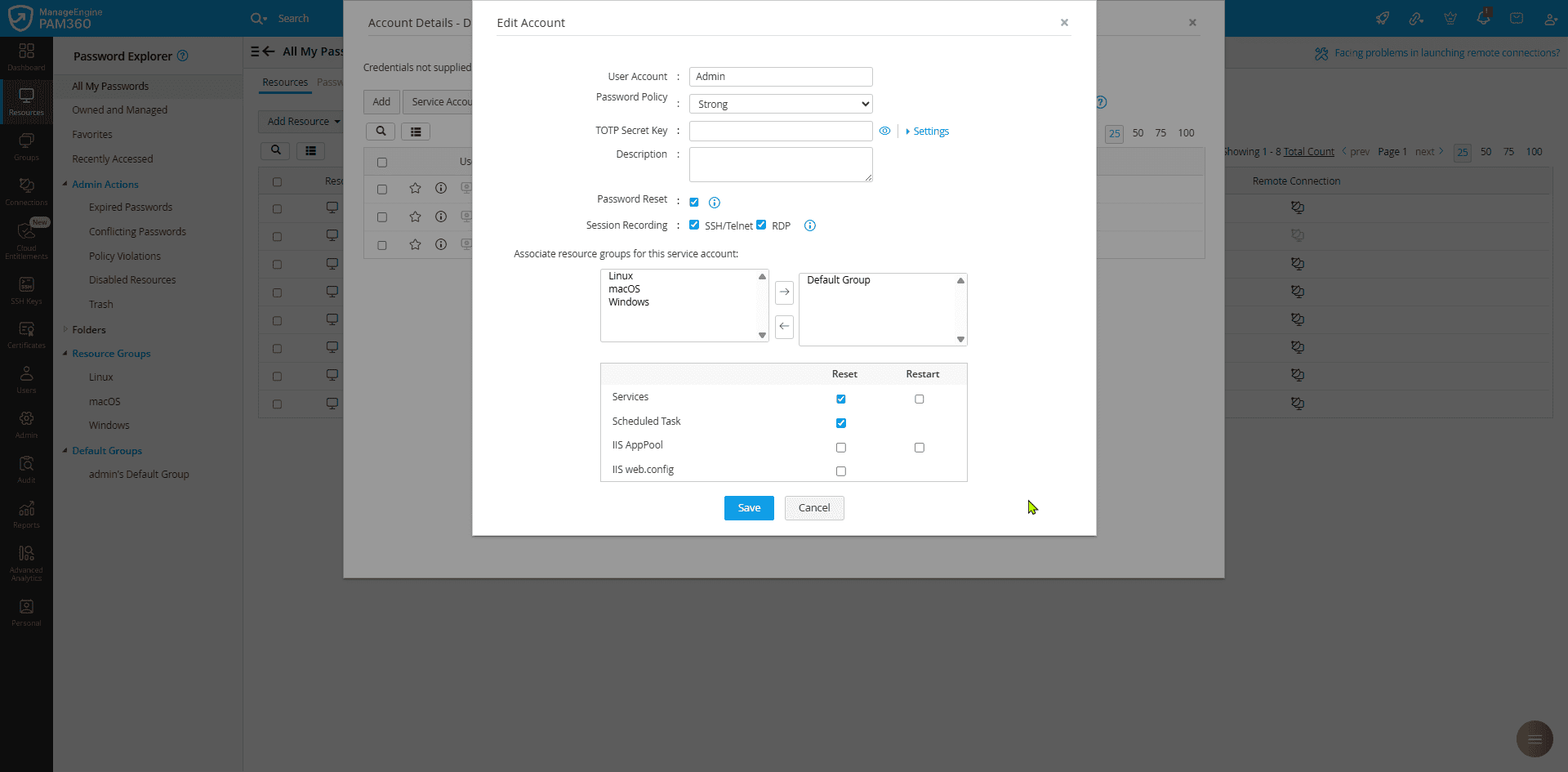
- Enable the Restart checkbox if you want PAM360 to restart the Windows service immediately after its password is updated.
- Select the checkbox for the service account you added in the Windows Domain resource and click Save.
- To verify associated services, select an account and go to Service Accounts >> Supported Service Accounts. Here, you will see a list of services that use this domain account as a log-on account. When you reset the domain account password, the new password will be updated in the associated services on the remote machine.
In some cases, it may be necessary to stop and restart services during a domain account password reset. For such cases, you can configure PAM360 to wait for a specific time interval before restarting the services after the domain account password rotation. Follow these steps for the configuration procedure:
- Navigate to Admin >> Customization >> General Settings.
- On the General Settings page, select Password Reset from the left pane and enable the Wait for a specified time period (in seconds) between stopping and starting the services checkbox.
- By default, PAM360 waits for 60 seconds before restarting the services. Modify this by entering the duration in seconds in this field based on your requirements.
- Click Save to save the configured changes.
4. Viewing Service Account Status
For any Windows domain account enabled with service account password reset, you can view the details of associated service accounts and scheduled tasks, and whether their passwords were rotated during the domain account password reset. Follow these steps to view the status of the service account:
- Navigate to the Resources tab and click on the desired Windows Domain resource.
- In the Account Details window that appears, select the desired domain account for which you wish to know the status of service account password reset, and click on the Service Accounts button at the top pane.
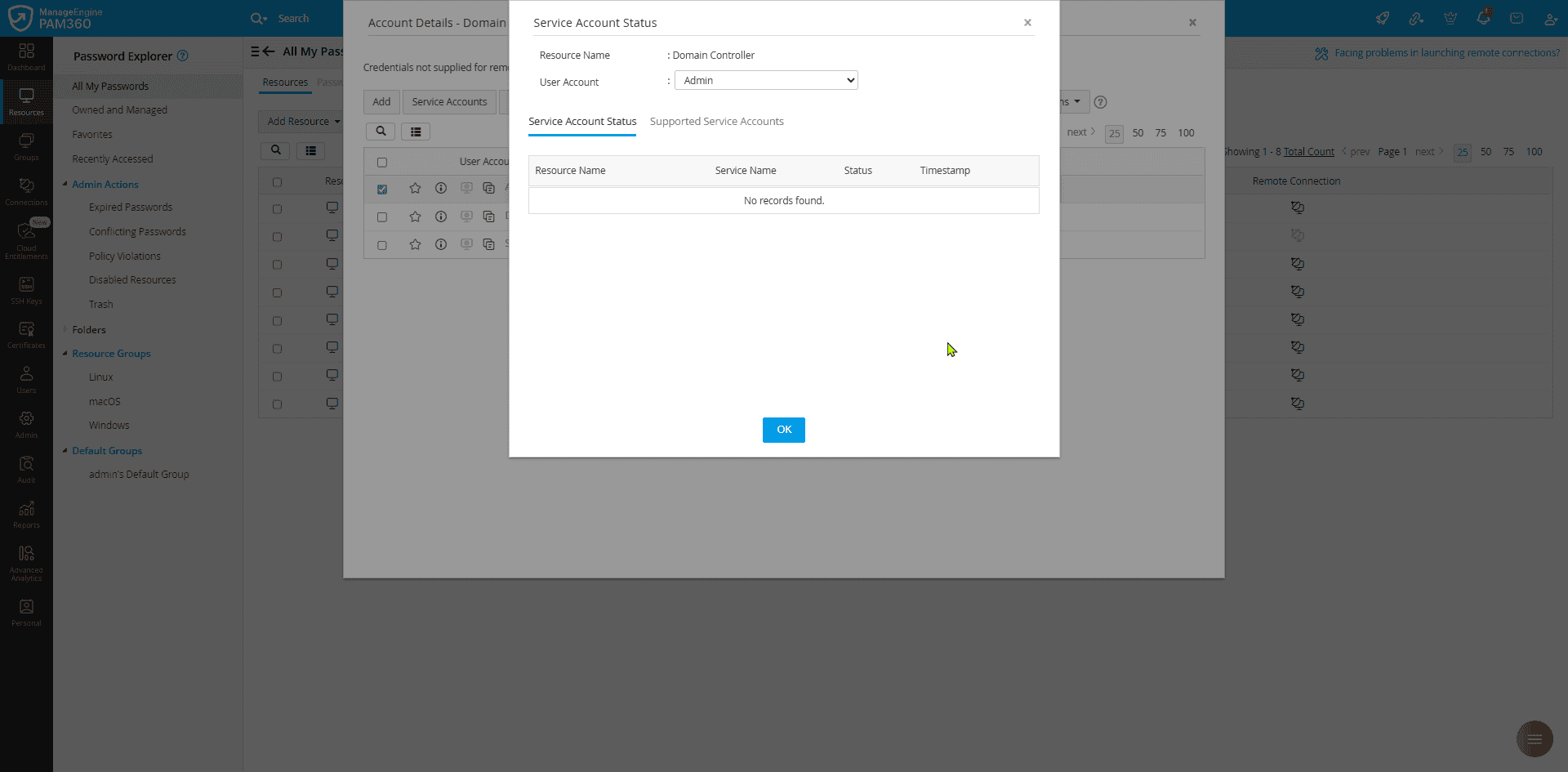
- In the window that appears, switch to the Service Account Status tab to view the status of all associated service accounts along with relevant details such as the service name, the resource on which the service is running, its status, and timestamp.
Additional Detail
If you have created schedules for rotating the domain account passwords, the service account password reset will also follow the configured Windows Domain account password reset schedule.