

Release Stage and Status
The release stage contains the built-in statuses for the 9 release stages. Release statuses indicate the progress of a release request within the stage.
You can manage the stages and status in the Release module under Admin > Release Management > Release Stage and Status.
-
Use the
 icon to edit the name and description of the stages. Note that you cannot create or delete stages.
-
Click on a stage name to expand the stage details. You can preview and manage statuses for each stage from the expanded menu. Use the
 icon to sort the statuses in alphabetical order. You can also limit the number of records displayed in this menu.
Manage Release Statuses
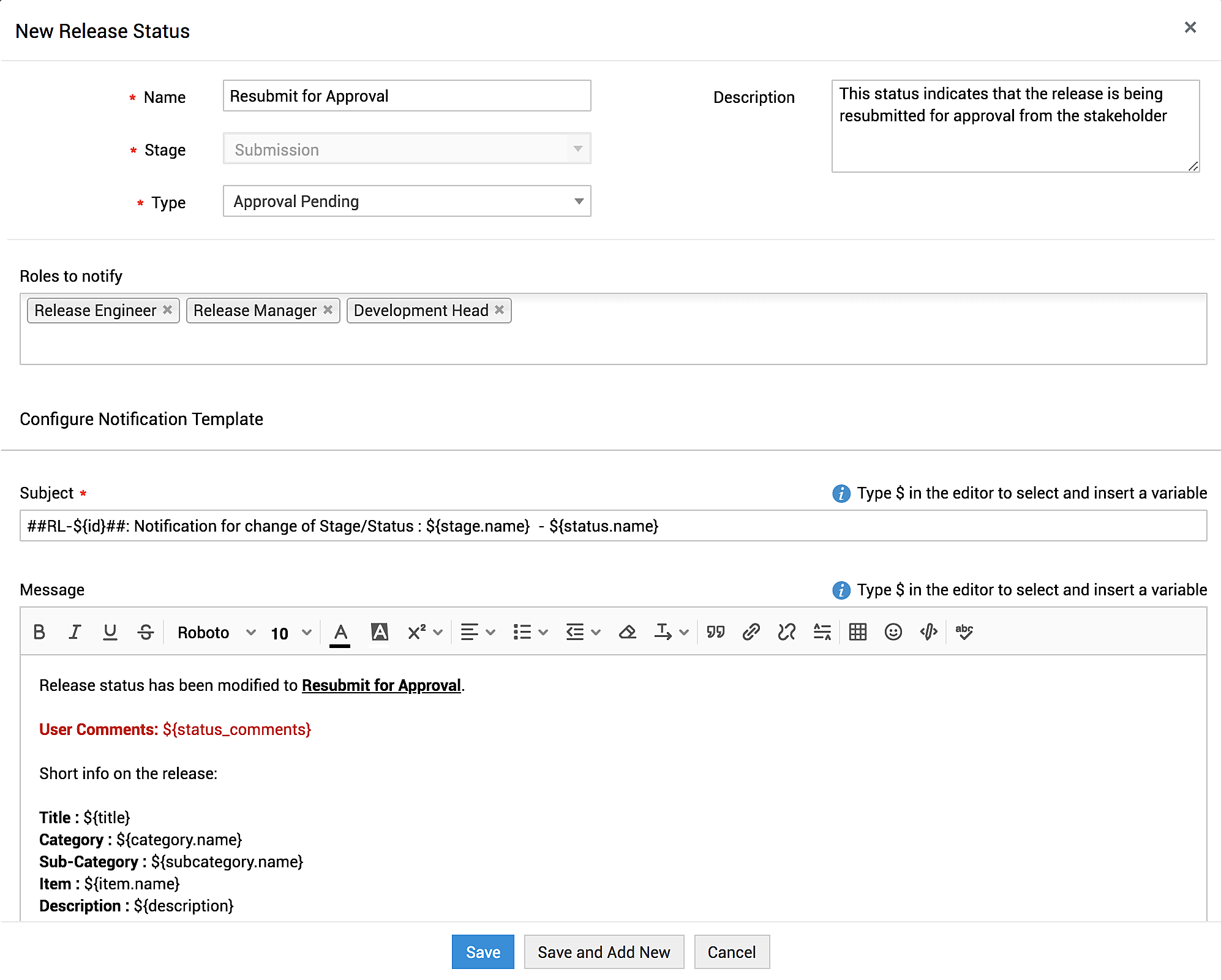
On the expanded release stage menu, click New Release Status. Fill out the New Release Status form using the pointers below:
(* indicates mandatory fields)
-
Name* - Add a unique name for the release status.
-
Stage* - Auto-populated.
-
Type* - Select the type of status you are adding. The statuses Success, Canceled, and Failed are categorized as completed statuses and the other statuses such as Open, On hold are categorized as in-progress statuses.
-
Description - Describe the usage of the status.
-
Roles to notify - Select the release roles to be notified when the release moves to the current stage and status.
-
Configure Notification Template - Enter the details to be sent in the notification to the release roles selected above. Use the $ symbol to add variables to the notification.
-
Subject*: Enter a brief subject, such as summary of the notification.
-
Message: Enter the notification message. You can format the notification using the editor header.
-
Click Save or Save and Add New.
Use the icon to edit or delete a status. Note that you can delete only selective built-in statuses and custom-created statuses. Additionally, editing the types of prominent statuses is restricted.
If a status is deleted while it is used in a release workflow or in release requests, it will be moved to an inactive state. Use the filter drop-down to view inactive statuses.
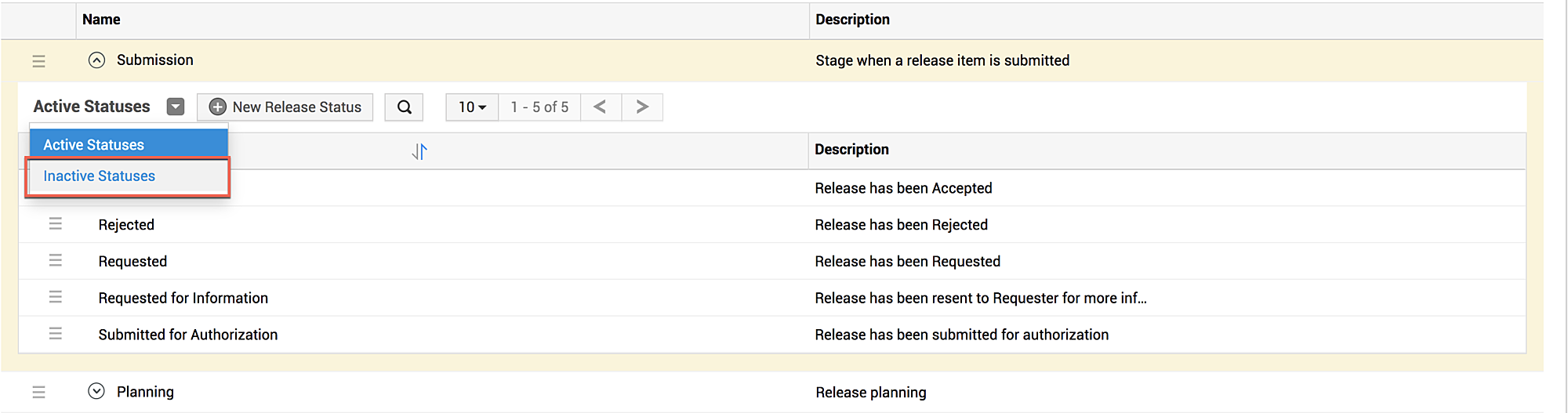
To reactivate an inactive status, edit the inactive status and uncheck the Not for further usage box. Click Update to reactivate the status.
Predefined Release Status in ServiceDesk Plus MSP
The following tables display the default statuses present under each stage and their configurations:
Submission Stage
|
Status |
Explanation |
Roles to be Notified |
|
Accepted |
Release has been accepted. |
Release Manager, Release Requester |
|
Rejected |
Release has been rejected. |
Release Manager, Release Requester |
|
Requested |
Release has been requested. |
Release Manager |
|
Requested for Information |
Release has been resent to the requester for more information. |
Release Requester |
|
Submitted for Authorization |
Release has been submitted for authorization. |
Release Requester, Release Manager |
Planning Stage
|
Status |
Explanation |
Roles to be Notified |
|
Approved |
Release plan has been approved. |
Release Engineer, Release Requester, Development Head |
|
In Progress |
Release plan is underway. |
Release Engineer |
|
Rejected |
Release plan has been rejected. |
Release Engineer, Release Requester |
|
Requested for Information |
Release plan has been resent to the engineer for more information. |
Release Requester |
|
Submitted for Authorization |
Release plan has been submitted for authorization. |
Release Manager |
Development Stage
|
Status |
Explanation |
Roles to be Notified |
|
Back Out |
Release has been restored. |
Release Engineer |
|
Completed |
Prerequisites for the release are developed. |
Release Engineer, Release Manager |
|
In Progress |
Development of prerequisites is under way. |
Release Engineer, Release Manager |
|
On Hold |
Development is in pause. |
Release Engineer, Release Manager |
|
Requested for Information |
Release has been resent to the engineer for more information. |
Release Engineer, Release Manager |
Testing Stage
|
Status |
Explanation |
Roles to be Notified |
|
Completed |
Release has been tested. |
Release Engineer, Release Manager |
|
Failed |
Release has failed in testing. |
Development Head, Release Engineer, Release Manager |
|
In Progress |
Testing is underway. |
Release Engineer |
|
On Hold |
Testing is in pause. |
Release Engineer |
UAT Stage
|
Status |
Explanation |
Roles to be Notified |
|
Accepted |
Release has been accepted. |
Release Engineer, Release Manager |
|
In Progress |
UAT is underway. |
UAT Owner |
|
On Hold |
UAT is in pause. |
Release Manager, UAT Owner |
|
Pending for Acceptance |
Release is awaiting approval. |
Release Manager, UAT Owner |
|
Rejected |
Release has been rejected. |
Release Engineer, Release Manager |
Deployment Stage
|
Status |
Explanation |
Roles to be Notified |
|
Deployed |
The release has been deployed. |
Release Engineer, Release Requester |
|
Failed |
Deployment has failed. |
Release Engineer, Release Requester |
|
In Progress |
Deployment is underway. |
Release Engineer |
|
On Hold |
Deployment is in pause. |
Release Engineer |
Training Stage
|
Status |
Explanation |
Roles to be Notified |
|
Completed |
Training has been completed. |
Release Engineer, Release Manager |
|
In Progress |
Training is underway. |
Release Manager |
|
Not yet started |
Training is yet to begin. |
Release Engineer |
Review Stage
|
Status |
Explanation |
Roles to be Notified |
|
Completed |
Review has been completed. |
Release Engineer, Release Manager |
|
In Progress |
Review is underway. |
Release Engineer, Release Manager |
|
Rejected |
Release has been declared ineffective. |
Release Engineer, Release Manager |
Closure Stage
|
Status |
Explanation |
Roles to be Notified |
|
Canceled |
The release has been canceled. |
Release Engineer, Release Manager |
|
Completed |
The release has been completed. |
Release Engineer, Release Manager, Release Requester |
|
Failed |
The deployed service does not work. |
Release Engineer, Release Manager, Release Requester |
|
In Progress |
Release closing process is underway. |
Release Engineer, Release Manager, Release Requester |