
Notification center
Last updated on:
In this page
Overview
The Notification Center offers a centralized view of real-time alerts generated by Log360 to help you stay aware of configuration issues, system warnings, and other events that may require action. Notifications can be accessed from any page, allowing you to respond promptly when needed.
Click the  icon in the top-right corner of the console to view all active notifications.
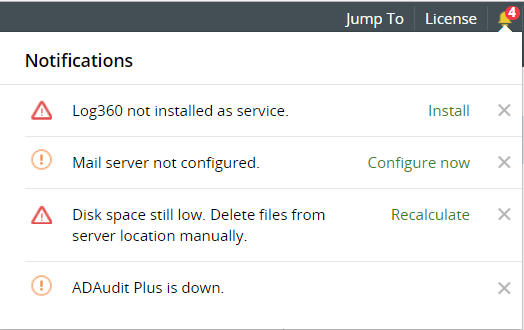
Filtering notifications
You can filter notifications based on their severity using the drop-down menu in the Notification Center. The available options are:
- All
- Critical
- Warning
- Info

Types of alerts
The product notifies a variety of operational, configuration, and security activities. The notifications displayed may vary based on the events identified in the product. These may include, but are not limited to:
- Configuration reminders
- Service or component availability issues
- Integration or connectivity failures
- Disk space or resource-related warnings
- Security hardening recommendations
- Feature-specific alerts from integrated components
- Agent and device status
Managing alerts
The product allows administrators to manage alerts by resolving issues or removing alerts that are no longer needed.
Resolving an alert
Click the action link associated with an alert. You will be redirected to the relevant page where you can complete the required configuration or corrective action.

Deleting an alert
Click the  icon to remove an alert from the Notification Center.

You can also click Clear All at the bottom of the panel to dismiss all visible alerts at once.

Read also
This page explained how notifications are displayed, the types of alerts generated, and the actions available to resolve or clear them. For more information on navigating the interface and viewing log data, refer to: