Alarm message match criteria
When creating or updating a notification profile, a new criterion - When any Alarm Message matches <Input text field> - is available. See notification profile criteria to learn more.
This feature allows you to define custom conditions using text or regex patterns to filter alarm messages. If an alarm message for a device matches the specified text or regex pattern, the associated notification profile will be triggered.
Input field guidelines
Ensure your input is precise and adheres to the supported formats to effectively match and trigger the desired notification profile.
Supported content types
- Plain text: Any sequence of alphanumeric characters.
- Regular expressions: Valid regex patterns for advanced and dynamic text matching.
Examples
| Condition | Regex pattern | Example condition | Matched alarm message |
|---|---|---|---|
| AND | (?=.*XXX)(?=.*YYY) | (?=.*Memory Utilization)(?=.*java.exe) | 1. Memory Utilization is 84%, Top 3 Processes: java.exe - 6.293%; idea64.exe - 5.941%; ulaa.exe - 4.222% |
| OR | (XXX)|(YYY) | (Memory Utilization)|(CPU Utilization) | 1. Memory Utilization is now back to normal 2. CPU Utilization is 10%, threshold value for this monitor is 1% |
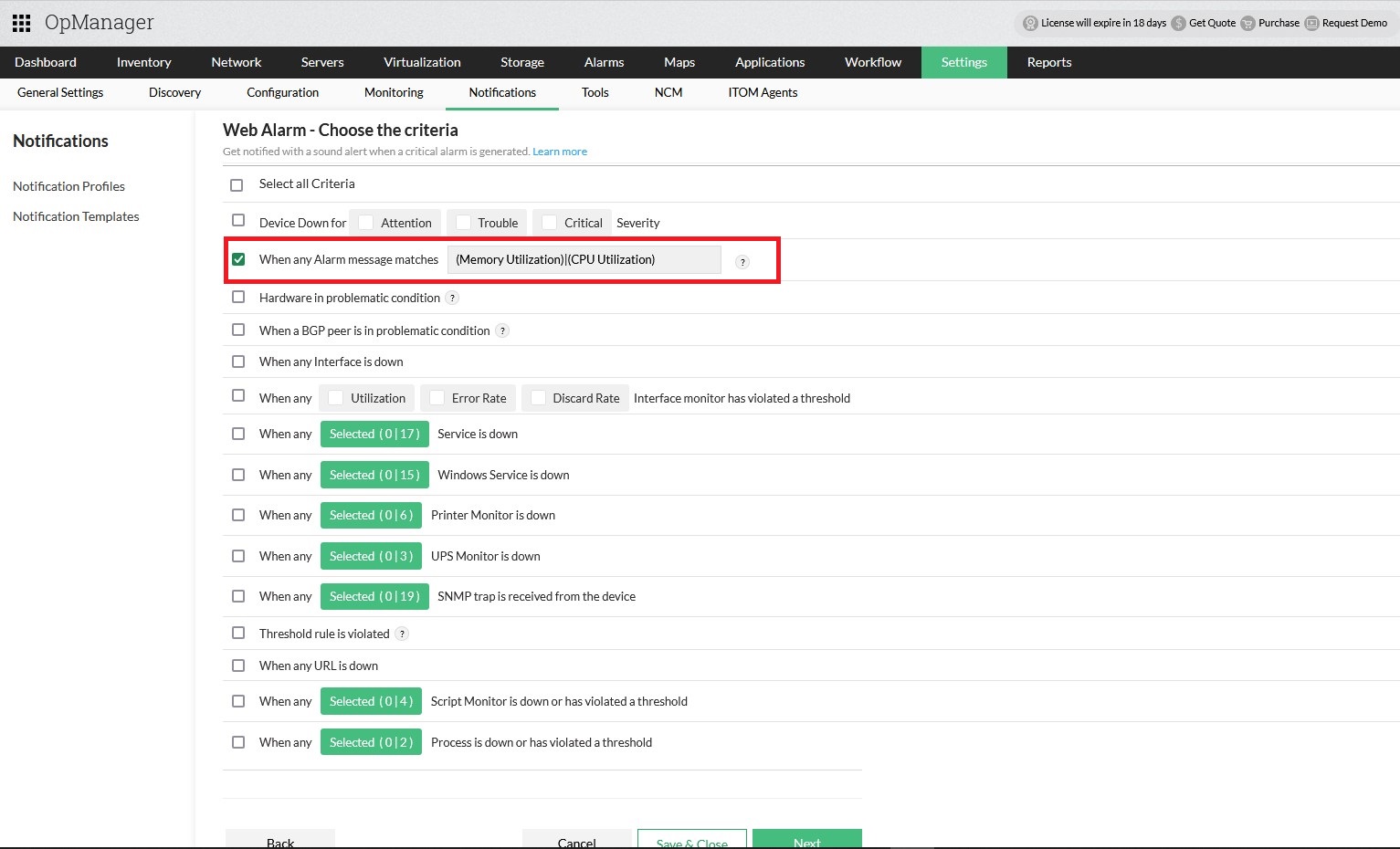
Restricted characters and patterns
Certain characters and regex patterns are restricted as they can lead to overly broad matches, capturing all alarm messages.
*..*|+^.*$(.*)?(?=)(?<=)[\s\S]+and similar patterns[\d\D]*and similar patterns[\u0000-\uFFFF]and similar patterns.{0,}and similar patterns{1,}and similar patterns
Patterns that cause excessive processing time:
These patterns can make matching take a very long time, so they're not accepted:
| Restricted pattern | Examples |
|---|---|
| A quantifier inside a group that is itself repeated | (a+)+, (a*)*, (\w+\s?)*, (\d+)+, (a{1,5}){2,}, (.*)+ |
| A group with alternatives (|) that is repeated | (a|b)*, (error|warn)+, (up|down){1,}, (a|ab){2,5} |
| Backreferences to an earlier group | (a)\1, (\w+)\s\1, (? |
| Adjacent wildcards (Two or more unbounded wildcards adjacent to each other) | .*.*, .*.+.*x, .*?.+? |
Note: To ensure accurate and effective filtering, avoid using overly generic regex patterns. Carefully define your criteria to match the specific alarms you want to target.