Audits and Reports of Keys and Certificates
PAM360 ensures thorough tracking of all user activities within the application, particularly concerning sensitive, privileged access information. To maintain transparency and accountability, every user action is meticulously recorded as an audit entry, complete with timestamps and the originating IP address. PAM360 provides an extensive auditing system specifically designed for keys and certificates. This feature captures and logs every action performed over keys and certificates within the product. Each audit entry includes critical details, such as:
- Who performed the action
- What operation was executed
- When it occurred
These detailed audit trails serve as a robust and traceable activity log, empowering administrators to oversee all user actions. Alongside the audits, PAM360 includes a robust reporting system for keys and certificates. These reports provide insights into the usage and activities of keys and certificates, aiding in compliance and operational efficiency. Administrators can generate detailed reports summarizing audits, simplifying the analysis and management of keys and certificate data.
To learn more about the auditing and reporting features of keys and certificates in PAM360, refer to the following sections:
- Keys and Certificates Audits
- Keys Reports
- Certificate Reports
- Exporting Audits and Reports
- Scheduled Reporting Tasks
1. Keys and Certificates Audits
To access comprehensive records of all key and certificate-related activities in PAM360, navigate to Audit >> Keys Audit. This section provides a detailed view of actions performed on cryptographic keys and certificates, including those associated with SSH, PGP keys, and SSL/TLS certificates. A search bar at the top-right corner of the audit table allows you to enter specific terms to filter and view the desired records.
- Keys Audit: Found under Audit >> Keys Audit, this includes certificate and keys-related audits. The keys-related audits are user-specific, meaning only the user performing the actions can access their audit records. For direct access to specific key-related operations, you can navigate to SSH Keys >> Key Rotation Auditor SSH Keys >> Key Association Audit.
- Certificates Audit: Accessible via Audit >> Certificates Audit, this feature is not user-specific. All certificate-related audit records are visible to administrators.
To quickly review recent activities, the last five key or certificate audit entries can be viewed directly in the Operation Audit section on the Keys Dashboard.
PAM360 supports integration with management systems for enhanced monitoring through SNMP traps and/or Syslog messages. To configure this, navigate to Admin >> Integrations >> SNMP Traps, and provide necessary details like Hostname and Port.
For configuring notifications regarding key and certificate audit operations:
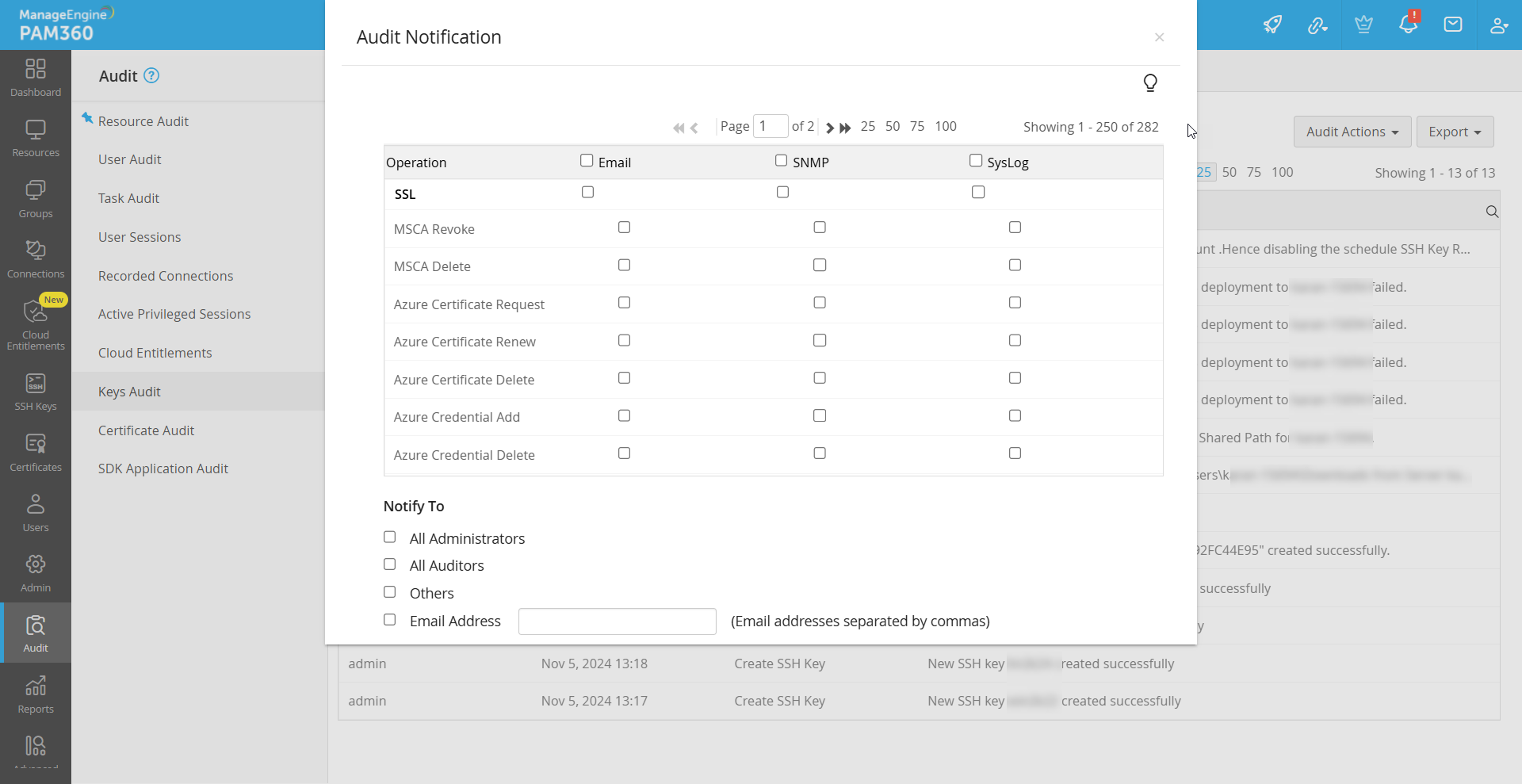
- Go to Audit >> Keys Audit >> Audit Actions >> Configure Keys Audit.
- Set up alerts via Email, SNMP traps, or Syslog.
- Notifications can be directed to all administrators, auditors, or specific users or groups, ensuring that the appropriate personnel are informed of key or certificate-related actions.
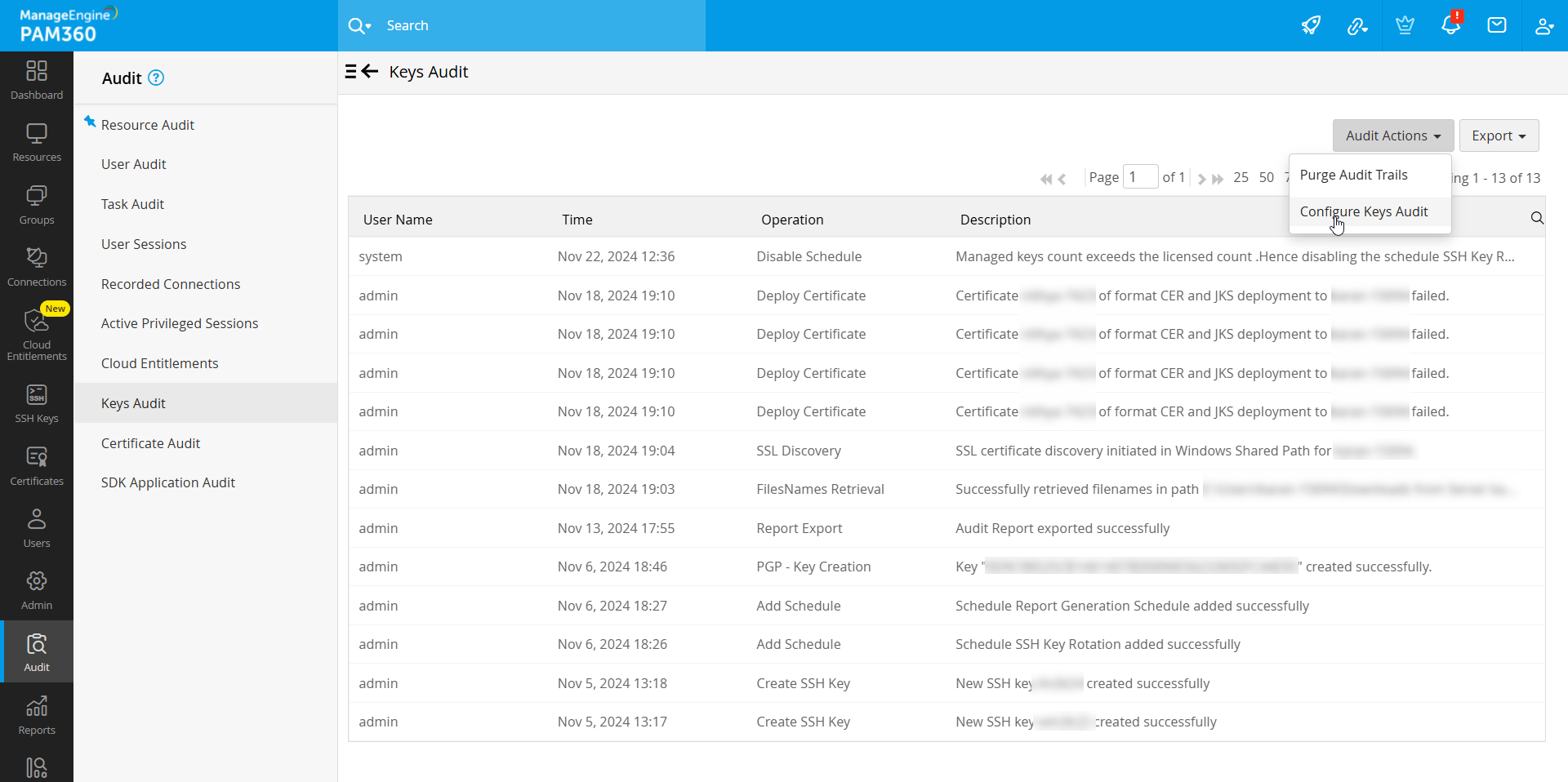
To manage data retention policies for audit trails, navigate to Audit Actions >> Purge Audit Trails under Keys Audit. Here, you can specify retention periods and configure automatic purging of records related to key operations such as discovery, association, rotation, and scheduling, after a defined number of days.
This streamlined approach to auditing, notifications, and data management ensures that key and certificate operations are secure, transparent, and easily monitored.
2. Keys Reports
PAM360 provides a suite of detailed reports on SSH key management activities, helping IT administrators make informed decisions. Reports include summaries and statuses of operations performed, presented in tables and visual graphs, offering an intuitive overview of your key management processes.
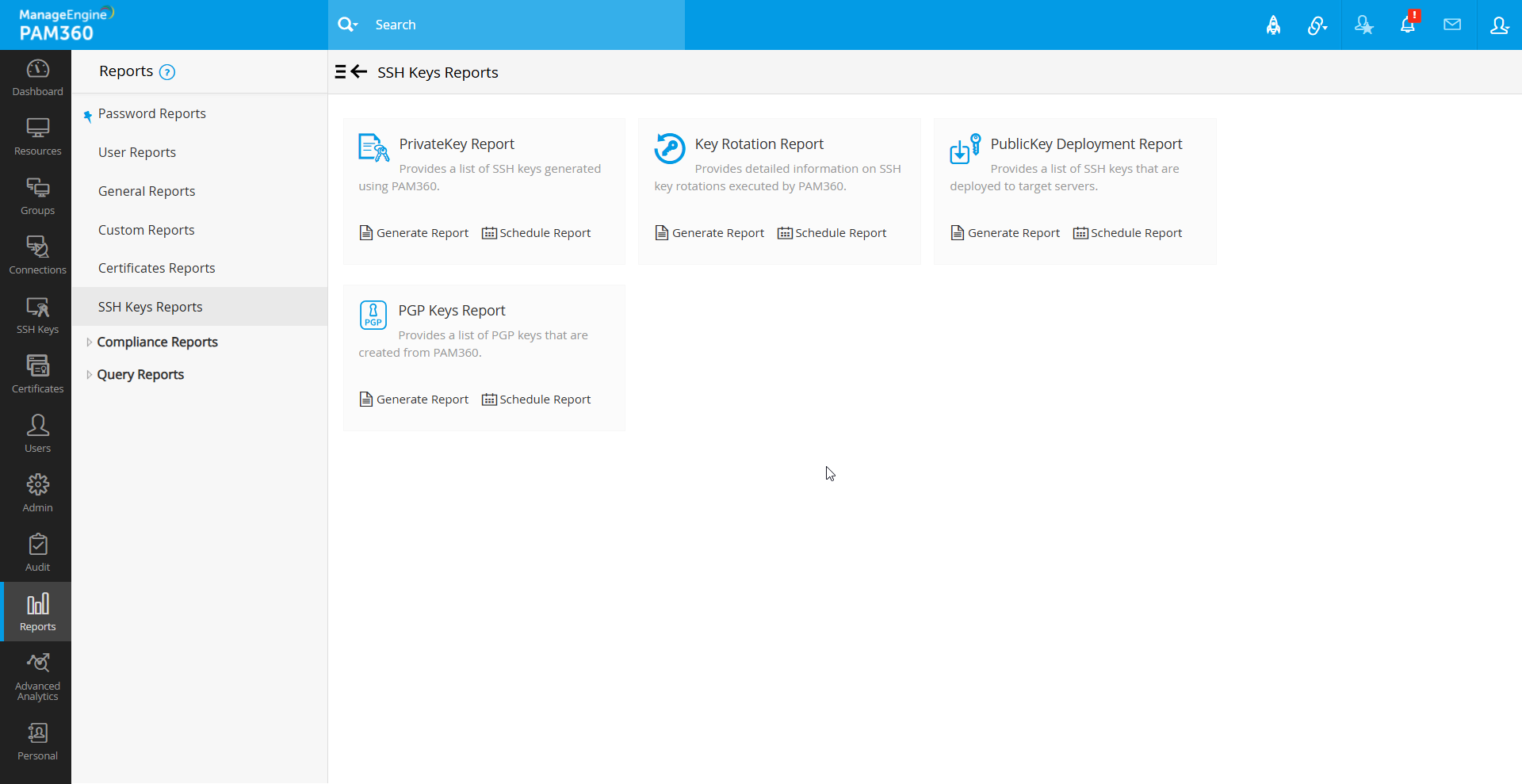
You can access these reports from the Reports tab in the GUI, with specific reports such as:
- Private Key Report: Details on SSH keys generated or imported through PAM360.
- Private Key Rotation Report: Information on SSH key rotations performed within PAM360.
- Public Key Deployment Report: Records of SSH keys deployed to target systems.
- PGP Keys Report: Summary of all PGP keys stored and managed in PAM360.
To filter reports by date, generate a report and use the Time Period at the top-right of the window. Specify a start and end date to view records within a specific timeframe. Only the selected timeframe's data will be included when exporting filtered data.
3. Certificate Reports
PAM360 offers a robust suite of SSL/TLS certificate reports to help administrators efficiently manage and monitor certificates across their infrastructure. These reports provide detailed insights into various aspects of certificate lifecycle management, ensuring enhanced visibility, compliance, and operational efficiency.
3.1 Types of Certificate Reports
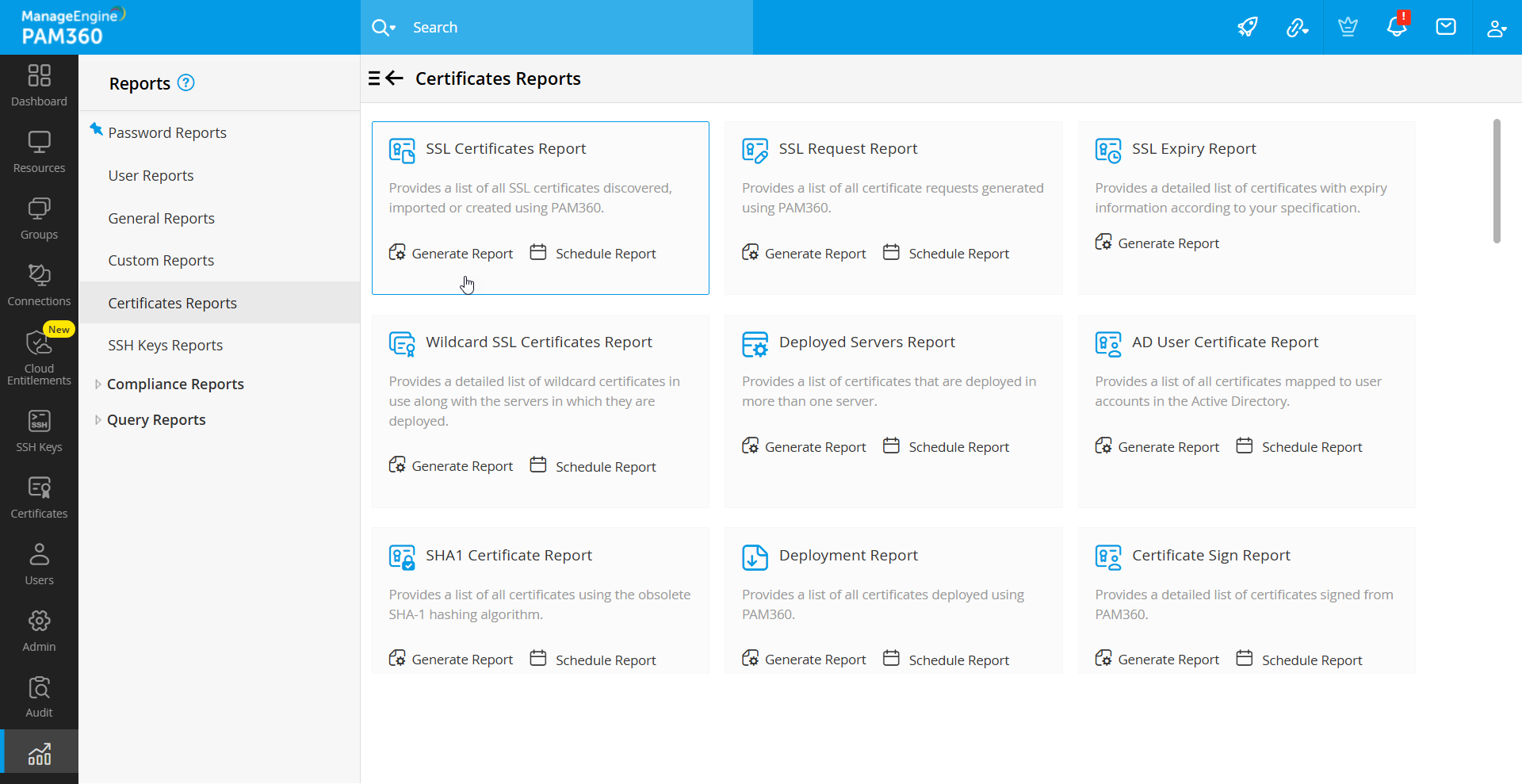
- SSL Certificate Report: Provides a comprehensive list of all SSL certificates imported, discovered, or created using PAM360.
- SSL Request Report: Displays detailed information about all certificate requests raised from PAM360.
- SSL Expiry Report: Offers a filtered view of certificates nearing expiry, with details relevant to the selected timeframe.
- Wildcard SSL Certificates Report: Highlights wildcard certificates in use and lists the servers where these certificates are deployed.
- Deployed Servers Report: Details certificates deployed on multiple servers, providing a clear overview of their usage.
- AD User Certificates Report: Lists all certificates mapped to user accounts in Active Directory.
- SHA1 Certificates Report: Provides insights into SHA-1 certificates deployed within the organization.
- Deployment Report: Summarizes certificates deployed via PAM360.
- Certificate Sign Report: Tracks certificates signed using MSCA or a root certificate from Key Manager Plus.
- Let’s Encrypt Requests Report: Tracks the status of certificate requests submitted to Let’s Encrypt CA.
- Buypass Go SSL Requests Report: Details the insights of all the SSL certificate requests submitted to Buypass Go SSL CA.
- ZeroSSL Requests Report: Details the insights of all the SSL certificate requests submitted to ZeroSSL CA.
- GoDaddy Orders Report: This report details the insights of all the SSL certificate requests submitted to GoDaddy with vital information.
- The SSL Store Orders Report: This report details the insights of all the SSL certificate requests submitted to The SSL Store.
- DigiCert Orders Report: This report details the insights of all the SSL certificate requests submitted to DigiCert.
- GlobalSign Orders Report: Details certificate orders requested from GlobalSign CA.
- Let’s Encrypt Certificates Report: A subset of the SSL Certificate Report, focusing on certificates obtained from Let’s Encrypt.
- Buypass Go SSL Certificates Report: Tracks the status of certificate requests submitted to Buypass Go SSL CA.
- ZeroSSL Certificates Report: Displays details of certificates requested from ZeroSSL CA.
- SSL Vulnerability Report: Provides details on vulnerability scans performed on SSL certificates stored in PAM360.
- Certificate Renewal Report: Summarizes renewal activities, including auto-renewals and manual renewals from third-party or local CAs.
- Azure Certificate Report: Lists Azure portal certificates managed in PAM360.
- Load Balancer Deployment Report: Displays certificates deployed to load balancers, including information on services, virtual servers, and synchronization status.
- Azure Certificate Request Report: Tracks the status of certificate requests submitted to Azure Key Vault.
- AWS Certificate Request Report: Tracks certificate request statuses submitted to AWS-ACM.
- AWS Certificate Report: Details SSL certificates obtained from AWS-ACM.
- Certificates Sync Status Report: Tracks the synchronization status of SSL certificates deployed across multiple servers.
- MSCA Revoke and Delete Report: Tracks certificates revoked or deleted by MSCA, including revocation reasons.
- MSCA Certificates Report: Lists all SSL certificates issued by MSCA and managed through PAM360.
- MDM Certificates Report: Lists MDM certificates managed in PAM360, with filtering options for OS types.
- Sectigo Certificate Report: Lists SSL certificates imported from or created by Sectigo Certificate Manager (SCM).
- Kubernetes TLS Secrets Report:
- Azure TLS Secret Reports: Provides details of Azure TLS secrets managed in PAM360.
- ACME Requests Report: Summarizes SSL certificate requests submitted to ACME providers.
- ACME Certificates Report: Lists SSL certificates issued by ACME providers.
These reports enable administrators to gain a comprehensive understanding of their SSL/TLS certificate landscape, ensuring proactive management, enhanced security, and streamlined operations.
Upon generating a report, the following options can be used to enhance usability and flexibility:
- Date Filter: View reports within a specific time frame by applying a date filter.
- Column Chooser: Customize the displayed report attributes by selecting the required fields.
- Export Options: Export reports in PDF or CSV formats, or send them directly via email to designated recipients.
4. Exporting Audits and Reports
PAM360 allows you to export audit and report data in various formats, including CSV and PDF, or even email the report directly.
To export a report, navigate to the desired audit or report page and click the Export button at the top-right. From the dropdown that expands, select the export option as needed:
- PDF - Saves the required output as a PDF file.
- CSV - Export the report in CSV format.
- Email - Sends the report via email; you can enter the email addresses of the intended recipients.
5. Scheduled Tasks
Refer to this help document to learn more about creating and managing scheduled tasks for certificates.